
Free · Open Source · No Cloud
AirDrop for Android
PlainApp brings AirDrop-style wireless sharing to Android. Send files from your phone to any device on the same Wi-Fi — no account, no cloud, no cables.
Android 9.0+ · Google Play · F-Droid · GitHub
Download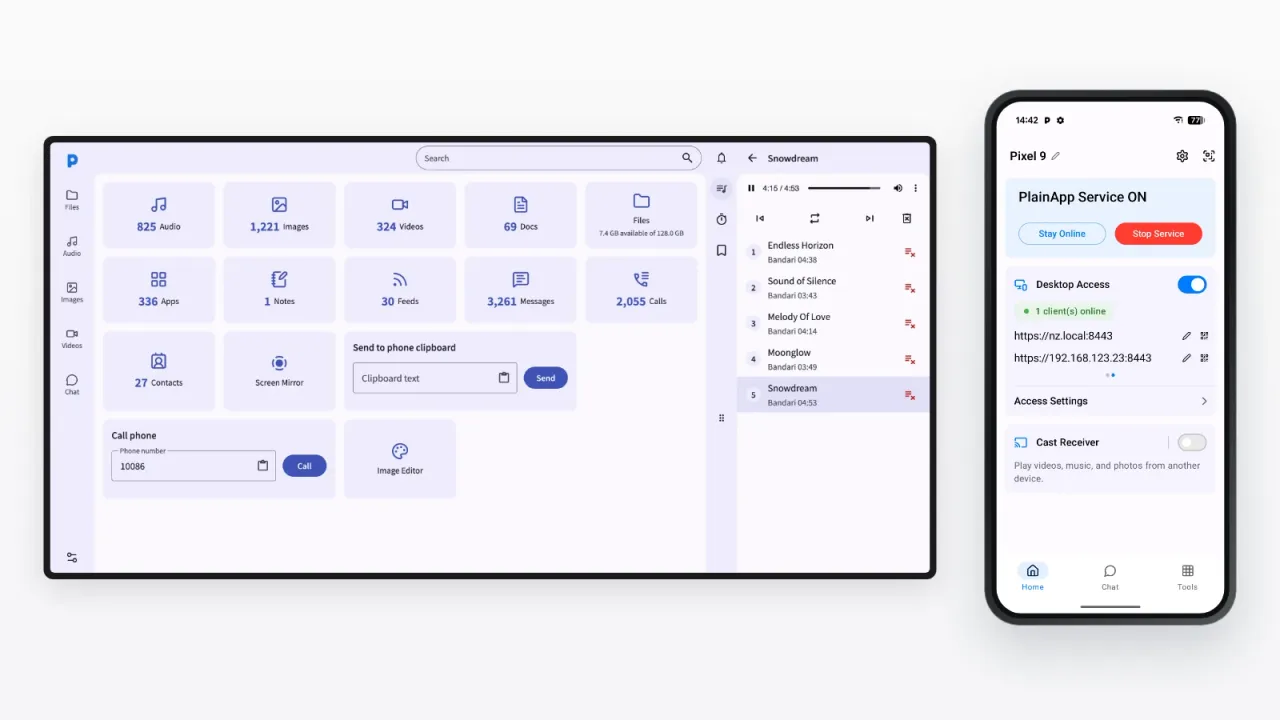
What is AirDrop — and why Android needs it
AirDrop is built into Apple's ecosystem. Android has Quick Share for nearby sharing, while PlainApp adds a browser-based way to transfer files and manage an Android phone from more device types.
Works over local Wi-Fi
Just like AirDrop, PlainApp uses your local network — no internet connection needed. Files stay on your own network.
No account needed
PlainApp does not use an account. Install the app, tap Start, and open its local address in a browser.
Android to PC, Mac, or tablet
Share files from your Android phone to any device with a browser: Windows PC, Mac, iPad, or another Android.
Encrypted by default
All traffic uses TLS with XChaCha20-Poly1305. Your files are private even if someone else is on the same Wi-Fi.
No install on the receiving end
The receiver just needs a browser. No app installation required on the PC or Mac side.
Fully open source
PlainApp is open source under AGPL 3.0. Inspect every line, build from source, or contribute on GitHub.
How to use AirDrop on Android — with PlainApp
Up and running in under 60 seconds.
- 1
Install PlainApp on your Android phone
Download from Google Play, F-Droid, or GitHub. The app is under 100 MB.
- 2
Tap "Start" in the app
PlainApp starts a secure local web server on your phone and shows you a URL like https://192.168.1.5:8443.
- 3
Open that URL in your browser
On your PC, Mac, or any other device on the same Wi-Fi, open the URL. Accept the self-signed certificate warning.
- 4
Drag and drop to transfer files
Use the Files section to browse your phone storage and upload or download any files — just like AirDrop, but through a browser.
AirDrop from Android to iPhone — yes, it works
Apple locks AirDrop to its own devices. PlainApp bridges the gap with a browser.
Android to iPhone
PlainApp runs on the Android phone. Open its URL in Safari on the iPhone — same Wi-Fi — and download or drag files across. Nothing to install on the iPhone.
iPhone to Android
From Safari on the iPhone, use the upload area to push photos and files to the Android phone. It works in both directions.
Any device with a browser
Because PlainApp is a web portal, iPhone, iPad, Windows, Mac, and Linux can all join — no account, no cloud, no file size limits.
Actually, PlainApp does a lot more
AirDrop only moves files. PlainApp turns your phone into a full web portal — all controllable from your browser.
Frequently Asked Questions
Does Android have AirDrop?
Android uses Quick Share for nearby sharing. It works across supported Android, ChromeOS, and Windows devices. PlainApp is different: it lets you manage an Android phone and transfer files from any modern browser, including on a Mac, iPhone, or iPad.
Can I send large files from Android to PC with PlainApp?
Yes. PlainApp streams files directly over your local Wi-Fi with no size limits. A 4 GB video file transfers as fast as your local network allows — typically much faster than cloud-based services.
Does PlainApp work without the internet?
Yes. PlainApp only uses your local Wi-Fi network. No internet connection is required for file transfers. Perfect for travel, airplanes, or locations with restricted internet access.
Why does the browser show a security warning?
PlainApp uses a self-signed TLS certificate for encryption. The browser warning is expected — click "Advanced" and "Proceed" to continue. Your data is fully encrypted.
Can I use PlainApp to share files between two Android phones?
Yes! Any two Android phones on the same Wi-Fi network can use PlainApp. One phone runs the app as the server, and the other connects via browser — or use the built-in P2P encrypted chat to share files directly.
Can I AirDrop from Android to iPhone?
Not with Apple's AirDrop — it only works between Apple devices. PlainApp is the bridge: it runs on your Android phone, and the iPhone connects through Safari over the same Wi-Fi. You can transfer files in both directions, with no app install on the iPhone.
Is there an online AirDrop for Android?
Yes — in the sense that PlainApp gives you a web-based AirDrop experience. Your phone serves a local web page, and any device on the same network (PC, Mac, iPhone) can open it in a browser and exchange files. Unlike Snapdrop-style web tools, nothing passes through external servers.
Take back control of your phone.
No cloud middleman. No monthly fees. Just your phone and your browser.