
Offline · Local Network · No Cloud
Transfer Files Without Internet
PlainApp lets you share files between your Android phone and any device over a local Wi-Fi network — completely offline, with no cloud, no servers, and no data leaving your home.
Free · Android 9.0+ · Works on any local Wi-Fi network
Download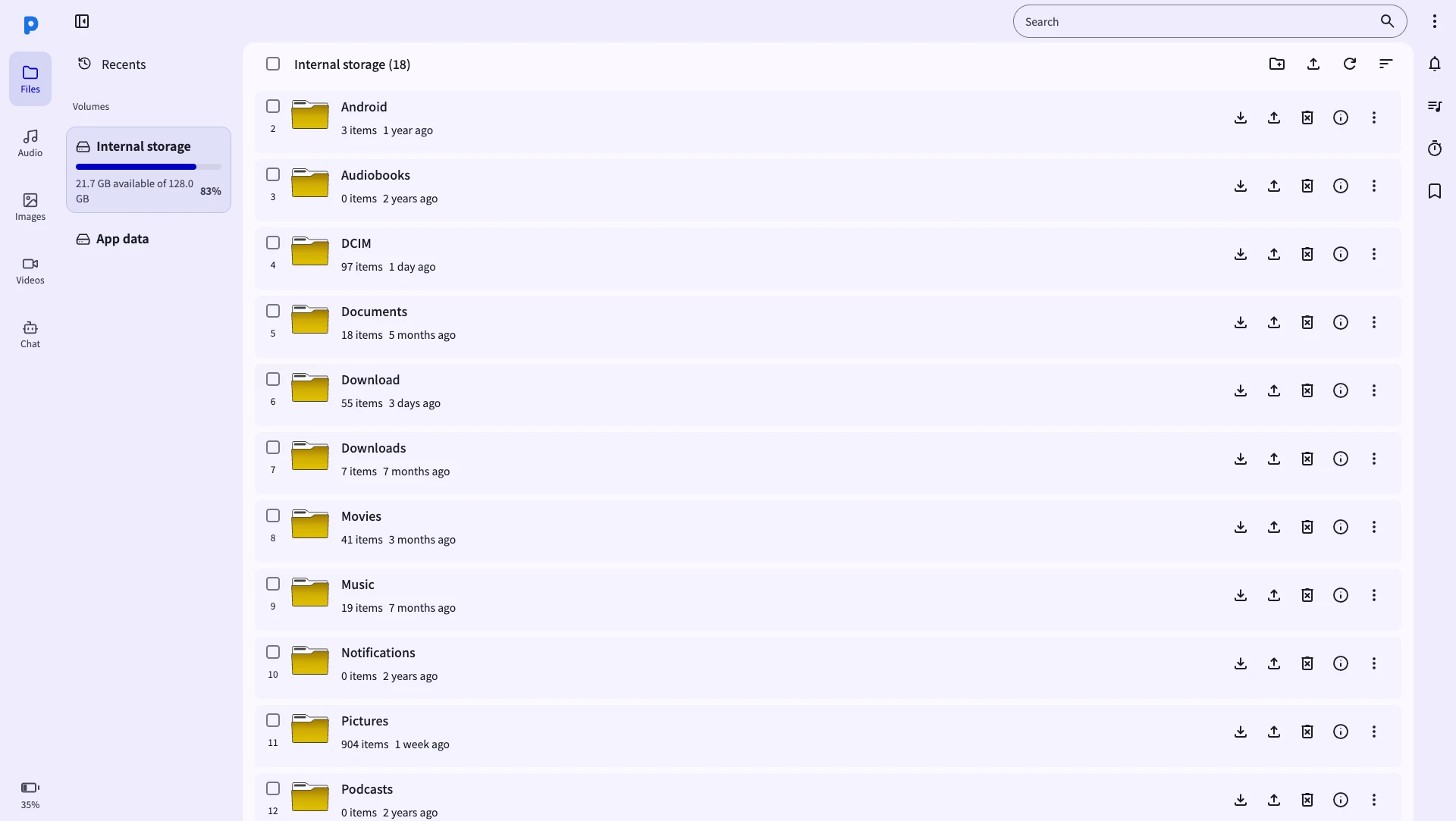
Why offline file transfer matters
Most file-sharing tools route your data through the cloud — adding latency, upload limits, and privacy risks. PlainApp stays entirely on your local network.
True privacy
Your files never pass through any third-party server. They go directly from your phone to your device — nothing intercepted, nothing logged.
Full network speed
No upload/download round-trip. Transfers happen at raw Wi-Fi speed — often 10–100× faster than cloud alternatives.
No size limits
Cloud services cap file sizes. PlainApp has no limit — transfer 10 GB videos just as easily as a 1 KB text file.
Works on any network
Hotel Wi-Fi, airplane mode with a hotspot, a travel router, or your home network — PlainApp works anywhere two devices share a local network.
Encrypted end-to-end
All transfers use TLS with XChaCha20-Poly1305. Even on the same local network, your data is encrypted.
Completely free
No premium tier for larger files. No storage subscription. PlainApp is 100% free and open source.
When is offline file transfer useful?
On an airplane
Create a Wi-Fi hotspot from your phone and connect your laptop to it. PlainApp works over the hotspot even with no cellular data.
At a hotel
Connect both devices to the hotel Wi-Fi. PlainApp runs on local network only — no internet required for transfers.
Backing up phone photos
Regularly back up your Android photos and videos to a PC or NAS without needing cloud storage.
Sensitive documents
Move confidential files between your phone and computer without any cloud service having visibility of them.
Sharing with colleagues
Transfer project files between team members on the same office network quickly, without email size limits.
Low or no data plan
PlainApp works with zero mobile data. Ideal when roaming internationally or on a limited data plan.
How to transfer files without internet using PlainApp
Just your phone and a browser. No internet required.
- 1
Connect phone and PC to the same Wi-Fi
Both devices need to be on the same network. This can be your home router, a mobile hotspot from your phone, or any other local network — no internet access required.
- 2
Install PlainApp and tap "Start"
Download PlainApp from Google Play, F-Droid, or GitHub. Open the app and tap Start — it shows a local address like https://192.168.1.5:8443.
- 3
Open the URL in your PC browser
Type the address into Chrome, Edge, or Firefox on your PC. Accept the self-signed certificate warning (expected and safe).
- 4
Transfer files freely
Use the Files section to upload or download anything. For phone-to-phone sharing, use the encrypted P2P Chat feature.
How PlainApp works — technically
PlainApp runs a secure HTTPS server directly on your Android phone. When you tap Start, it listens on your local IP address (e.g. 192.168.1.x:8443) and serves a full web app. All connections use TLS with a self-signed certificate. Your data never leaves the local network — not a single byte travels to the internet.
The P2P encrypted chat feature uses XChaCha20-Poly1305 with Ed25519 signatures for zero-knowledge file sharing between devices — no server involved.
Frequently Asked Questions
Can I transfer files without an internet connection?
Yes. PlainApp works entirely over your local Wi-Fi network. It does not need internet access — your files never leave your local network.
Does it work if I use my phone as a Wi-Fi hotspot?
Yes. Connect your PC to your phone's hotspot, then open PlainApp on the phone. Your PC and phone are on the same local network via the hotspot. Transfers work even with no mobile data active.
How fast is the transfer speed?
On a modern 5 GHz Wi-Fi 5 router, expect 20–80 MB/s. On Wi-Fi 6, speeds can exceed 100 MB/s. This is far faster than cloud upload/download roundtrips.
Can I transfer files between two Android phones without internet?
Yes. Both phones need to be on the same Wi-Fi network. One runs PlainApp as the server; the other connects via its browser. You can also use the built-in encrypted P2P chat to share files directly.
Is this safe on a shared network like a hotel?
All PlainApp connections are TLS-encrypted. However, for added security on untrusted networks, you can set a PIN in the app settings to restrict access to the web panel.
Take back control of your phone.
No cloud middleman. No monthly fees. Just your phone and your browser.