
Table of Contents
- Why Pairing Exists
- Trust Model & Cryptography
- Component Map
- Discovery Phase
- Pairing Sequence (Happy Path)
- Key Exchange Details
- Responder Accept/Decline Flow
- Cancel Flow
- Dual-Channel Delivery (LAN + BLE)
- Session & Peer Storage
- Security Properties
- State Machine Recap
Why Pairing Exists
PlainApp has no central account server. Devices must therefore answer two questions before they can talk:
- "Who are you?" — every device generates a stable
clientIdon first launch (a 13-character id derived from its Ed25519 key material). This is the only identifier used for routing, presence, and channel membership. - "Can I trust you?" — without a server to vouch for identity, the only way to be sure a peer is who they claim to be is for a human to confirm the pairing on both devices and for the protocol to verify cryptographic signatures.
Pairing produces a single artifact: a DPeer row in the database with
status="paired", a ChaCha20 key (the shared transport secret), and the
peer's Ed25519 public_key (for verifying future message signatures). Every
later protocol in the chat subsystem assumes these two fields exist.
Trust Model & Cryptography
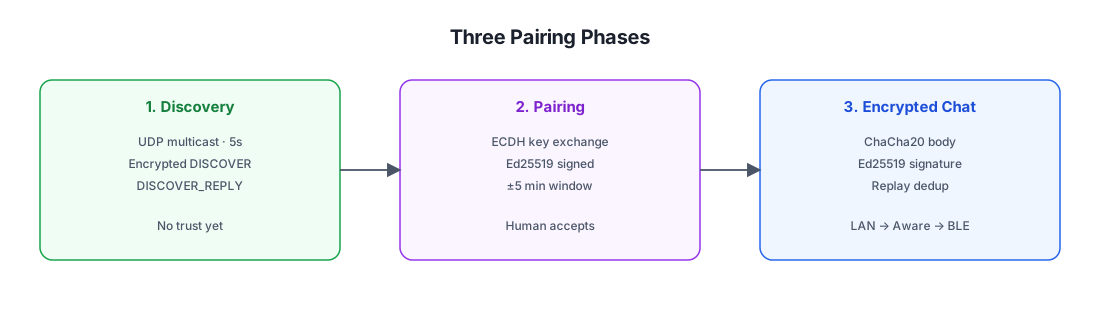
Pairing uses two independent cryptographic primitives:
| Primitive | Purpose | Lifecycle |
|---|---|---|
| Ed25519 (signature) | Authenticate the pairing request and response. Verifies "this really came from the device claiming to send it" and binds the timestamp to prevent replay. | The signing key is the device's long-term identity key. Its public half is stored as DPeer.public_key and later used by PeerChatParser.decrypt to verify every chat message signature. |
| X25519-style ECDH (key agreement) | Produce a shared secret that becomes the ChaCha20 transport key. The two devices compute the same secret without ever transmitting it. | Ephemeral key pair generated per pairing session, discarded immediately after the shared key is computed. The resulting 32-byte secret is stored as DPeer.key and reused for the lifetime of the pairing. |
There is no PIN, no QR code, no out-of-band code. Trust is established by:
- A human tapping Accept on the responder device (the user is asserting "yes, this is the device I want to pair with").
- Both sides verifying the other's Ed25519 signature on the request/response (proving the responder is talking to the same device that started the session and vice versa).
- A ±5 min timestamp window on both messages (preventing replay of an old captured handshake).
The asymmetry matters: a single human confirmation would be vulnerable to a man-in-the-middle (the attacker could pair with both sides separately). The Ed25519 signature on the ECDH public key prevents this — the responder verifies the request was signed by the same Ed25519 key that initiated the session, and vice versa, so an MITM cannot transparently substitute its own ECDH key without also controlling the long-term signing key.
Component Map
All pairing code lives in the discover/ package (not chat/peer/pair/):
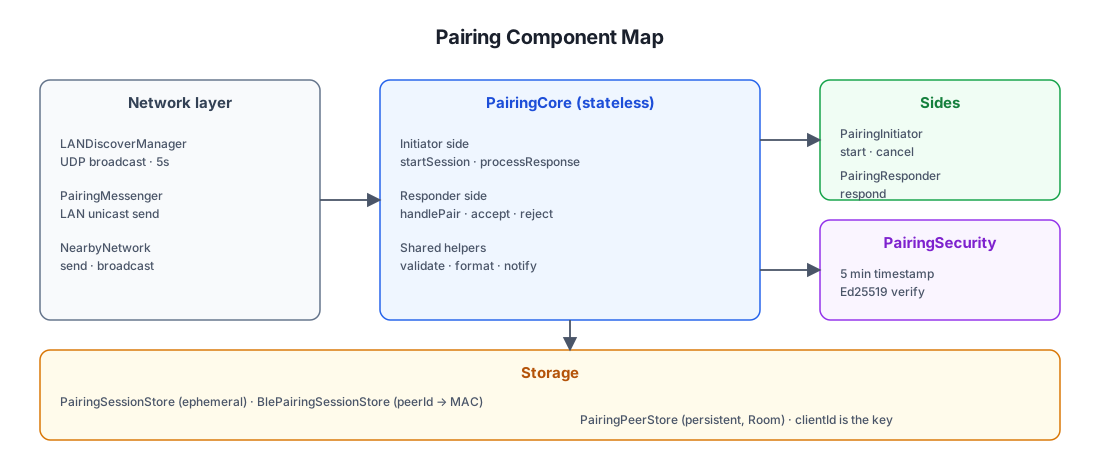
File locations
| Component | Path (under shared/src/commonMain/kotlin/com/ismartcoding/plain/) |
|---|---|
LANDiscoverManager | discover/LANDiscoverManager.kt |
PairingCore | discover/PairingCore.kt |
PairingInitiator | discover/PairingInitiator.kt |
PairingResponder | discover/PairingResponder.kt |
PairingSecurity | discover/PairingSecurity.kt |
PairingSessionStore | discover/PairingSessionStore.kt |
PairingPeerStore | discover/PairingPeerStore.kt |
PairingMessenger | discover/PairingMessenger.kt |
Discovery Phase
Before pairing can happen, devices must find each other.
LANDiscoverManager runs continuously once the app starts:
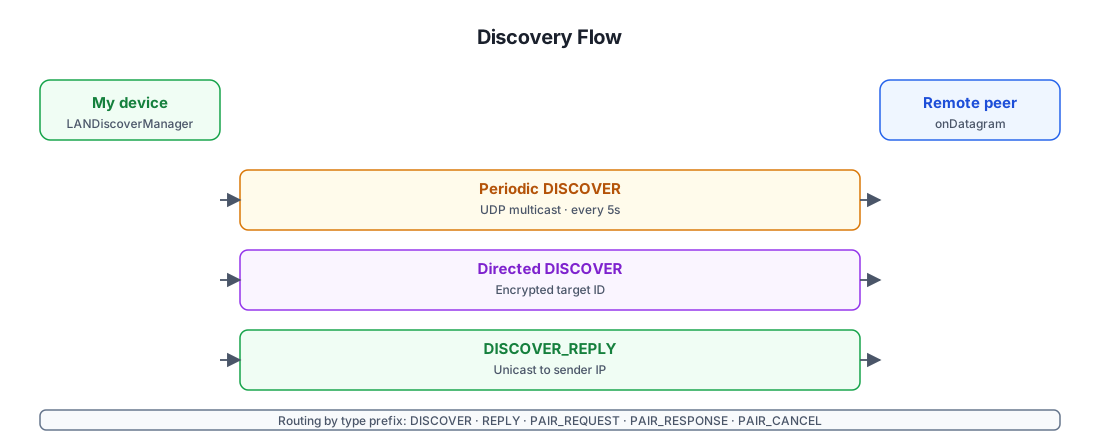
Why directed discovery is encrypted
The broadcast DISCOVER reveals nothing sensitive (just fromId=clientId), so
it's fine for any device on the LAN to see it. The directed variant, however,
is used when one device already knows another's clientId (e.g. it's paired
but the peer's IP has changed) and wants to wake it up. Encrypting the
target clientId with the peer's shared key means:
- The right peer can decrypt the
toId, recognize itself, and reply. - Every other device on the LAN sees only ciphertext — they cannot enumerate
which
clientIds the sender is trying to reach.
This is a small but real privacy property: passive LAN observers cannot build a graph of who is paired with whom.
Aware flags in the reply
The DISCOVER_REPLY carries awareSupported and awareRunning. These are
not persisted to the database — they're stored in-memory in PeerCacher
and refreshed on every reply (and also from BLE scan-response serviceData).
The transport layer consults them to decide whether to attempt a Wi-Fi Aware
link or skip straight to BLE.
Pairing Sequence (Happy Path)
The end-to-end flow when both devices are on the same LAN and the user accepts the pairing:
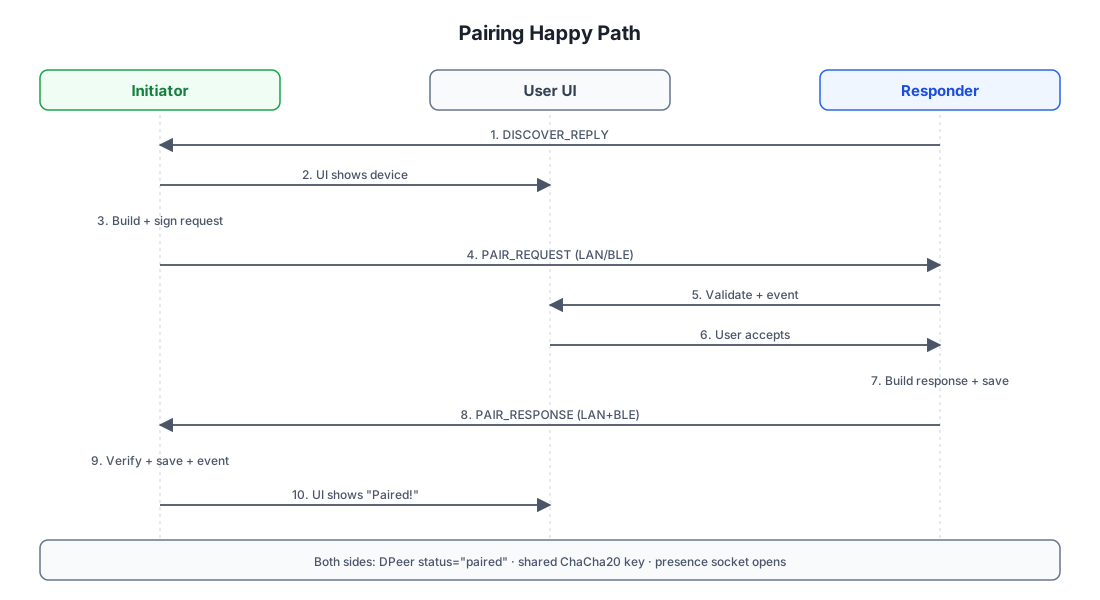
Why both sides store the peer independently
Notice that both the initiator (step 9) and the responder (step 7) call
PairingPeerStore.save(...) for the other device. This is intentional: each
device ends up with a DPeer row keyed by the other's clientId, containing
its own copy of the shared ChaCha20 key and the other's Ed25519 public key.
There is no central registry — the pairing is symmetric and self-contained.
Why the responder computes the key first
The responder's acceptPairingRequest computes the shared key immediately
upon acceptance and persists it. This means the responder can start
receiving encrypted traffic before the response arrives back at the
initiator. If the response is lost in transit, the responder is still
paired — only the initiator needs to retry.
Key Exchange Details
The cryptographic core of pairing is a standard X25519-style ECDH key agreement, but with an Ed25519 signature layered on top to authenticate it.
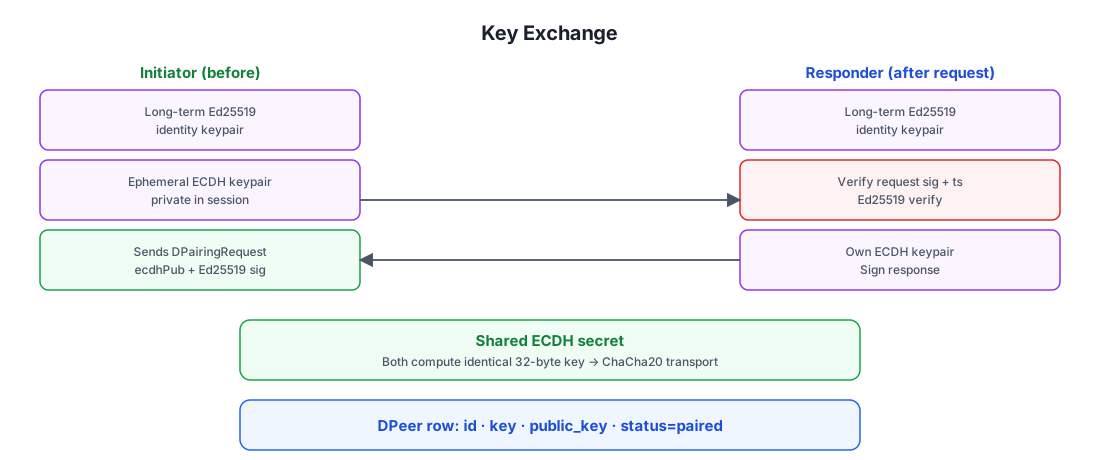
What the signature actually protects
The signed payload (toSignatureData()) is a canonical concatenation of the
stable request fields: fromId, fromName, port, deviceType,
ecdhPublicKey, signaturePublicKey, timestamp, and ips. By signing
the ecdhPublicKey together with the long-term signaturePublicKey,
the protocol binds the ephemeral key to the device's identity. An attacker
cannot substitute their own ECDH public key in transit without invalidating
the signature — and they cannot forge the signature without controlling the
long-term Ed25519 key.
This is what defeats a man-in-the-middle: even if the attacker relays every packet between the two devices, they cannot read the encrypted traffic (because they don't have either side's ECDH private key) and they cannot substitute their own ECDH keys (because the signatures would break).
Responder Accept/Decline Flow
The responder side exposes a UI dialog when a PAIR_REQUEST arrives. The
user can either accept or decline.
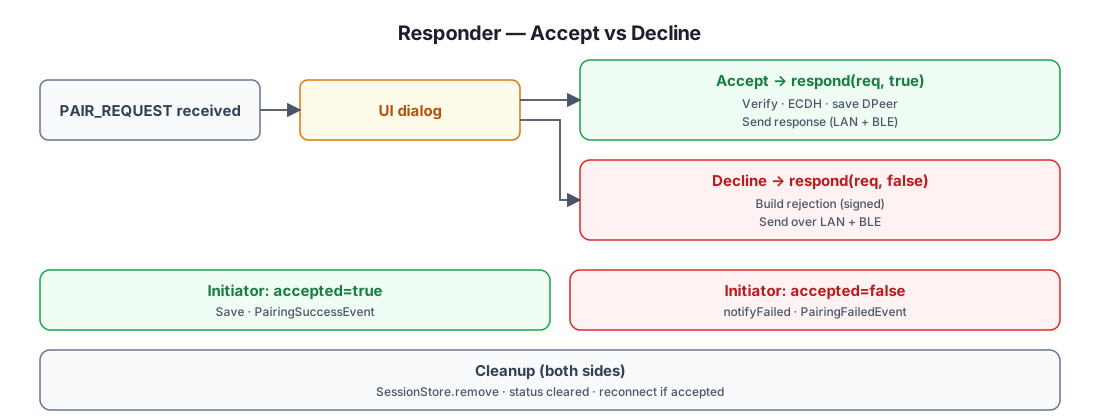
Why the responder fires PairingSuccessEvent immediately on accept
The responder's acceptPairingRequest calls PairingPeerStore.save(...)
and fires PairingSuccessEvent before sending the response. This is
deliberate: if the response never reaches the initiator (network glitch),
the responder is still paired — the next time the initiator tries to pair,
the responder's already-existing DPeer row will be picked up by the
presence system. The initiator simply retries; the responder does not need
to re-confirm.
Cancel Flow
Either side can cancel an in-flight pairing.
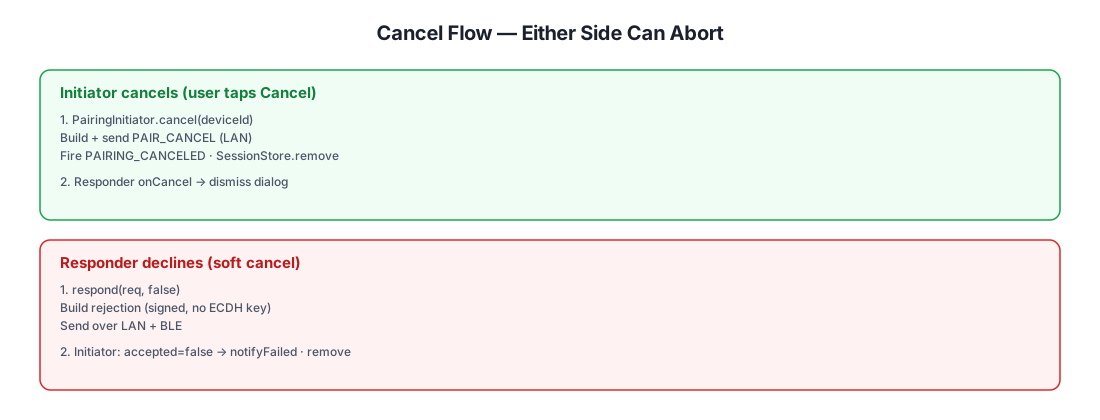
Note that DPairingCancel is sent over LAN unicast only (the initiator
already has the responder's IP from the discovery phase), whereas the
decline response is sent over both LAN and BLE because the responder
cannot be sure which transport the initiator is reachable on.
Dual-Channel Delivery (LAN + BLE)
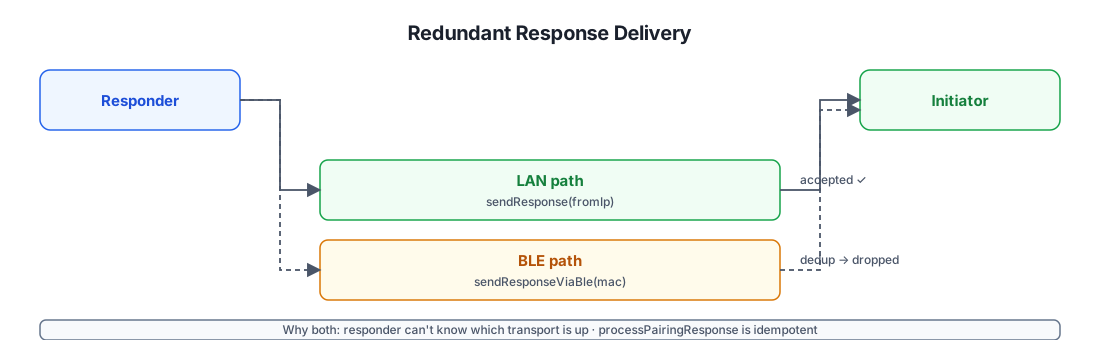
When the responder sends the DPairingResponse, it does so over both LAN
and BLE simultaneously. The initiator accepts the first copy and silently
discards the duplicate.
Why BlePairingSessionStore exists
When a PAIR_REQUEST arrives over BLE, the responder doesn't have a LAN IP
for the initiator — only its BLE MAC address. BlePairingSessionStore maps
peerId → MAC so the response can be routed back over BLE if needed. This
is a small, in-memory, ephemeral map that is only populated for BLE-routed
requests and cleared once the response is sent.
Session & Peer Storage
Two stores participate in pairing, with very different lifetimes:
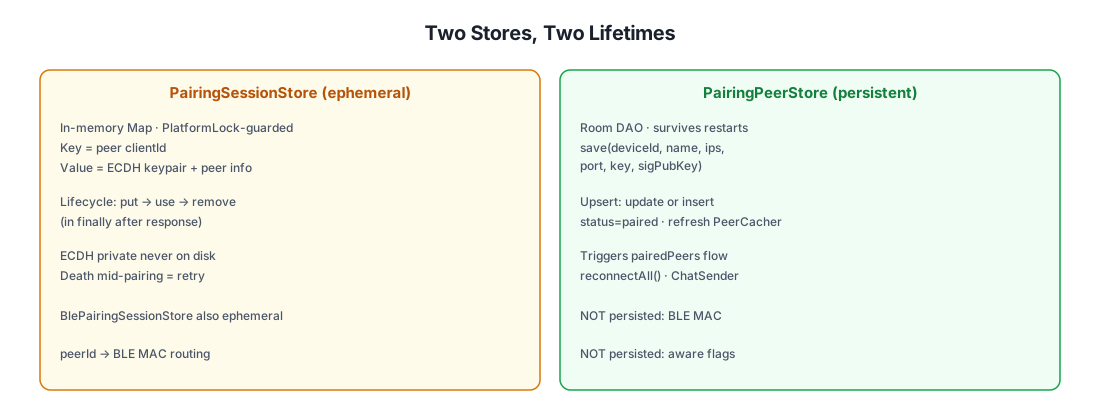
Why clientId is the only persisted identifier
Android randomizes the BLE MAC address on every connection, so storing it
would be useless. The clientId is derived from the device's long-term
Ed25519 key material, so it is:
- Stable across app reinstalls (the key is in the platform keystore).
- Self-authenticating — anyone claiming a
clientIdmust prove they hold the corresponding Ed25519 private key (verified on every signed message). - Privacy-preserving — only an 8-byte SHA-256 prefix (
shortId) is ever broadcast over BLE for discovery; the fullclientIdis only revealed to devices you actually pair with.
Security Properties
| Property | How it's achieved |
|---|---|
| Confidentiality | All transport is ChaCha20 encrypted with the ECDH-derived shared key. The key never leaves the two devices after pairing. |
| Authentication | Every signed message (pairing request/response, chat createChatItem, channel invite/update/kick) is Ed25519-verified against the sender's stored public_key. |
| Integrity | Ed25519 signatures cover the full request body; any tampering invalidates the signature. |
| Replay resistance | ±5 min timestamp window (enforced by PeerChatParser and PairingSecurity). ChatMessageReceiver.seenSignatures dedups within the window. |
| Man-in-the-middle resistance | The ephemeral ECDH public key is signed together with the long-term Ed25519 public key. An MITM cannot substitute its own ECDH key without breaking the signature. |
| Forward secrecy (limited) | ECDH key pairs are ephemeral per pairing session. Compromising the long-term Ed25519 key later does not decrypt past traffic (the shared key is also still needed — but if both the ECDH private keys and the stored DPeer.key are wiped, past captures cannot be decrypted). |
| Denial-of-service resistance | onDatagram wraps every message in try/catch so a malformed packet cannot kill the discovery receiver. PeerCircuitBreaker skips a flaky transport for 30 s after 2 failures. |
| Privacy (directed discovery) | LANDiscoverManager.discoverSpecificDevice encrypts the target clientId with the peer's key — passive LAN observers cannot enumerate who is paired with whom. |
| Identity stability | clientId is derived from long-term Ed25519 key material in the platform keystore — stable across reinstalls, self-authenticating, and not tied to a phone number or email. |
What pairing does NOT defend against
- Physical device compromise. If an attacker gains root on a paired
device, they can read the shared key from the database and impersonate
that peer. There is no hardware-backed key store enforcement for the
shared transport key (only for the Ed25519 signing key, via
SignatureHelper). - Active relay attacks. An attacker who can simultaneously relay BLE and LAN traffic between two devices that think they're pairing with each other could theoretically position themselves in the middle — but the Ed25519 signature on the ECDH public key means they cannot read the traffic, only relay it. This is the same trade-off as Bluetooth pairing without numeric comparison.
- Network-level blocking. A firewall can block UDP multicast, BLE can be jammed, and Wi-Fi Aware can be unavailable. The system degrades gracefully (BLE is the guaranteed fallback for paired peers) but cannot bypass an actively hostile network.
State Machine Recap
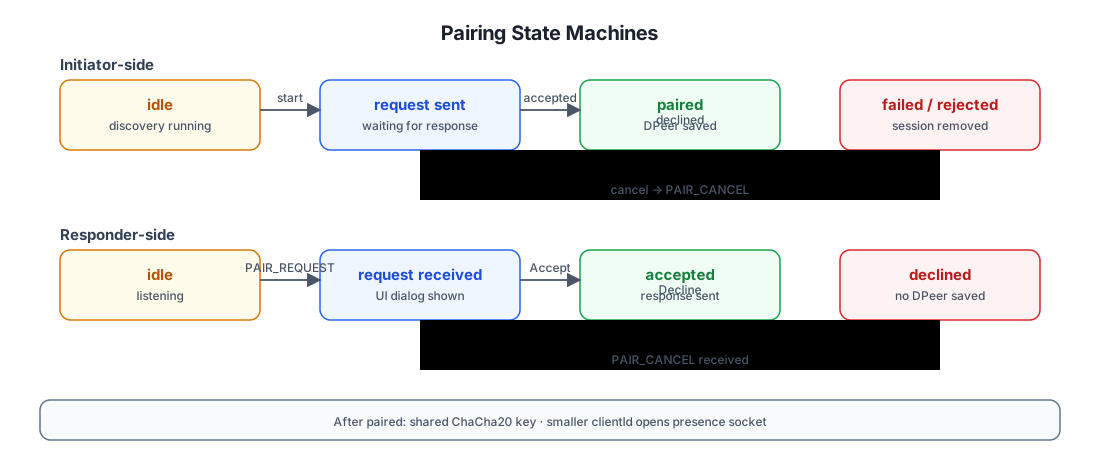
Further Reading
- Chat Architecture — what the shared key is used for: peer chat send/receive, channel fan-out, presence, file downloads.
apitest/groups/discovery.sh— executable test plan exercising the discovery and pairing API surface end-to-end.