
Table of Contents
- High-Level Architecture
- Video Encoding Pipeline (Android)
- VideoPacket Protocol Design
- Video Decoding Pipeline (Web)
- WebGL2 Rendering
- Loss Detection & Error Recovery
- Orientation Change Handling
- System MediaProjection Lifecycle
- Remote Control: Touch Injection
- Audio Pipeline
- Performance Optimizations
- Design Patterns Recap
High-Level Architecture
PlainApp screen mirror is an end-to-end low-latency casting system: the Android device captures screen content, hardware-encodes it to H.264 video and Opus audio, and pushes it over WebSocket using a custom binary protocol to the web client; the web client decodes via the WebCodecs API and renders directly to a Canvas via WebGL2, with zero CPU copies throughout. A transparent touch overlay closes the loop, turning pointer input back into gestures on the phone.
No WebRTC, no RTMP, no intermediate server. The entire pipeline is:
Android VirtualDisplay → MediaCodec H.264 Encoder → WebSocket →
WebCodecs VideoDecoder → WebGL2 Texture → Canvas
Why not WebRTC?
WebRTC is designed for real-time communication. Its ICE/STUN/TURN negotiation, congestion control, and jitter buffering are overkill for LAN screen casting. PlainApp's use case is:
- Same LAN, latency < 5ms, no NAT traversal needed
- Pursuing extreme low latency, no jitter buffering
- High quality, bitrate can be high (8Mbps)
- Screen control (touch injection), where WebRTC's DataChannel adds unnecessary complexity
A custom binary protocol over WebSocket is lighter and more controllable for the LAN scenario.
Component map
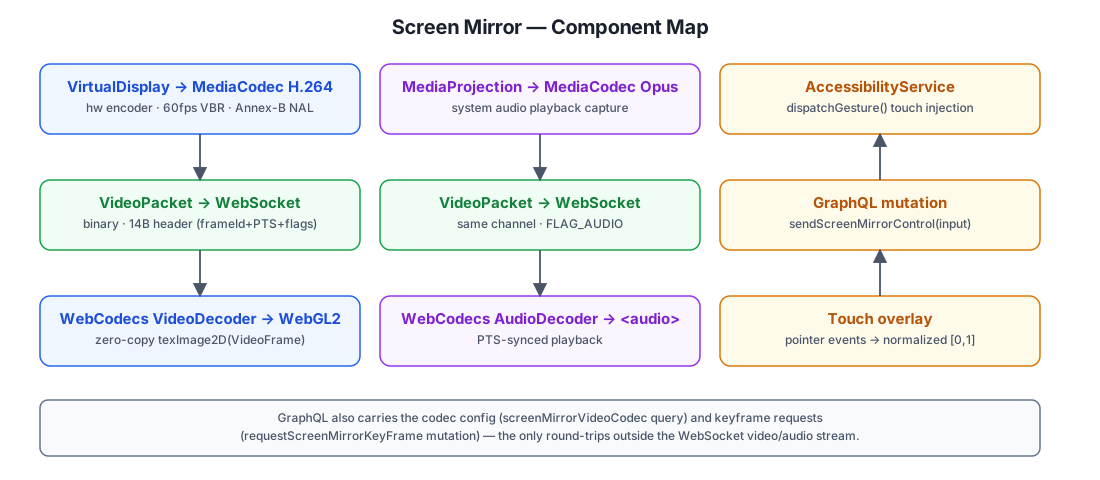
| Layer | Android | Web |
|---|---|---|
| Screen capture | MediaProjection + VirtualDisplay | — |
| Video encoding | MediaCodec H.264 hardware encoder | — |
| Audio encoding | MediaCodec Opus hardware encoder | — |
| Transport | WebSocket binary events | WebSocket receiver |
| Video decoding | — | WebCodecs VideoDecoder |
| Audio decoding | — | WebCodecs AudioDecoder → <audio> |
| Rendering | — | WebGL2 texture direct-render |
| Control | AccessibilityService gesture injection | Touch overlay → GraphQL mutation |
Video and audio always flow device → browser over the same WebSocket connection; control flows the opposite direction over GraphQL (sendScreenMirrorControl), which also doubles as the side-channel for the codec config (screenMirrorVideoCodec query) and keyframe requests (requestScreenMirrorKeyFrame mutation).
Video Encoding Pipeline (Android)
Encoding Parameter Tuning
Encoding parameters were tuned specifically for low-latency LAN screen casting:
| Parameter | Value | Notes |
|---|---|---|
KEY_FRAME_RATE | 60 | 60fps for smoothness |
KEY_I_FRAME_INTERVAL | 10 | IDR interval 10s, reduces keyframe overhead |
KEY_BIT_RATE_MODE | VBR (implicit, no explicit mode set) | Variable bitrate, scene-adaptive |
KEY_PRIORITY | 0 | Realtime priority |
KEY_LATENCY | 1 | Low-latency mode |
Bitrate is tiered by quality mode — higher bitrates (e.g. 24 Mbps) were tested and caused encoder/decoder frame drops and increased end-to-end latency without visible quality gain for screen content:
| Mode | Bitrate | Capture resolution |
|---|---|---|
| HD | 8 Mbps | 1080p short side |
| Smooth | 4 Mbps | 1080p short side |
| Low | 2 Mbps | 720p short side |
Encoder Low-Latency Configuration
MediaCodecVideoEncoder configures the encoder once at creation time:
MediaFormat.createVideoFormat(MIME, width, height).apply {
    setInteger(MediaFormat.KEY_COLOR_FORMAT, MediaCodecInfo.CodecCapabilities.COLOR_FormatSurface)
    setInteger(MediaFormat.KEY_BIT_RATE, bitrateBps)
    setInteger(MediaFormat.KEY_FRAME_RATE, frameRate)          // 60
    setInteger(MediaFormat.KEY_I_FRAME_INTERVAL, iFrameIntervalSec) // 10
    setLong(MediaFormat.KEY_REPEAT_PREVIOUS_FRAME_AFTER, 100_000L)
    setInteger(MediaFormat.KEY_COLOR_RANGE, MediaFormat.COLOR_RANGE_LIMITED)
    setInteger(MediaFormat.KEY_PRIORITY, 0)
    setInteger(MediaFormat.KEY_LATENCY, 1)
}
KEY_PRIORITY=0 and KEY_LATENCY=1 are the keys to low latency — they tell the encoder to prioritize real-time encoding over compression ratio. The input is a Surface created by MediaCodec.createInputSurface() and fed directly to VirtualDisplay — no SurfaceTexture readback, no I420 conversion, no CPU touches the pixels.
Capture Resolution
ScreenMirrorCaptureSize.compute() derives the actual capture size from the physical screen size, the quality mode's short-side target (720/1080), and the encoder's reported maxWidth/maxHeight and width/height alignment (queried once via MediaCodecVideoEncoder.queryEncoderCaps()), so the encoder never receives dimensions it can't accept.
Keyframe Requests
The web client can request an IDR frame via the GraphQL requestScreenMirrorKeyFrame mutation to recover from packet loss. Android responds via MediaCodec.PARAMETER_KEY_REQUEST_SYNC_FRAME:
fun requestKeyFrame() {
    val b = Bundle().apply { putInt(MediaCodec.PARAMETER_KEY_REQUEST_SYNC_FRAME, 1) }
    codec?.setParameters(b)
}
SPS/PPS and Keyframe Broadcast
After the encoder starts, INFO_OUTPUT_FORMAT_CHANGED delivers csd-0/csd-1 (SPS/PPS), which ScreenMirrorPipeline joins into a single Annex-B config blob and caches (cachedConfig). The first IDR that follows is cached too (cachedKeyFrame) so a freshly-connected web client can pull both via the screenMirrorVideoCodec GraphQL query without waiting for the next keyframe interval. When the config just changed (orientation or quality switch), Android does not send the new IDR as a normal video packet — it bundles SPS/PPS + IDR into one screen_mirror_video_codec WebSocket event, so the web client completes decoder reconfiguration and first-frame decoding in one shot instead of racing a stale decoder against a new bitstream.
Some OEM encoders (Qualcomm/Xiaomi) bundle SPS+PPS+IDR into a single output buffer carrying both BUFFER_FLAG_CODEC_CONFIG and BUFFER_FLAG_SYNC_FRAME. The drain loop only skips buffers that are pure config (isConfig && !isKey) — skipping a config-flagged buffer that also carries the sync frame would silently drop the IDR and leave the decoder with only P-frames, producing mosaic output.
VideoPacket Protocol Design
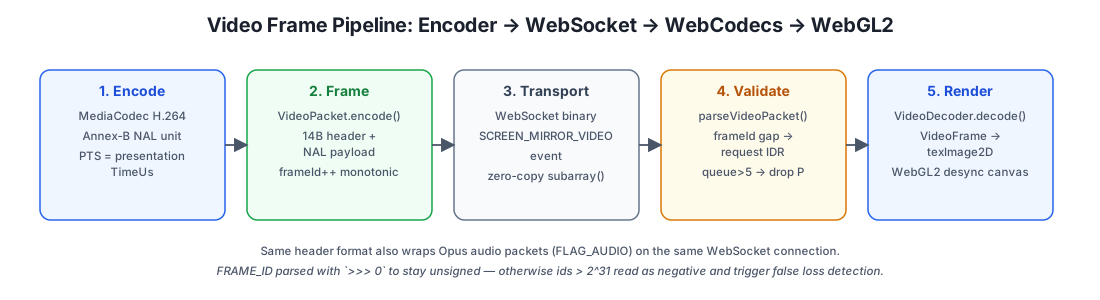
Both video and audio frames are wrapped in the unified VideoPacket binary protocol for WebSocket transport.
Protocol Format
+--------+--------+--------+--------+--------+--------+--------+--------+--------+--------+--------+--------+--------+--------+--------+
| MAGIC  | FLAGS  |           FRAME_ID (4 bytes, big-endian)            |              TIMESTAMP (8 bytes, BE)              |  DATA  |
| 0x56   |        |   byte2   |   byte3   |   byte4   |   byte5   |  byte6  |  byte7  | ...  |  byte13 |        payload...        |
+--------+--------+--------+--------+--------+--------+--------+--------+--------+--------+--------+--------+--------+--------+--------+
 \- 1B -/ \- 1B -/ \-------------------- 4B ----------------------/ \----------------------- 8B ------------------------/ \- var -/
| Field | Size | Description |
|---|---|---|
MAGIC | 1 byte | Fixed 0x56 ('V'), for validation |
FLAGS | 1 byte | 0x01=keyframe, 0x02=config, 0x04=audio |
FRAME_ID | 4 bytes | Monotonically increasing frame number, uint32 big-endian |
TIMESTAMP | 8 bytes | Encoder PTS in microseconds, big-endian |
DATA | variable | H.264 NAL unit or Opus data |
Both Android's VideoPacket.encode() (in commonMain, so its wire format is covered by JVM unit tests without any Android dependency) and the web's parseVideoPacket() implement this format independently — there's no shared serialization library, just a spec both sides honor.
Design Notes
FRAME_IDunsigned parsing:((buf[2] << 24) | (buf[3] << 16) | (buf[4] << 8) | buf[5]) >>> 0— must use>>> 0to ensure unsigned, otherwiseframeId > 2^31is parsed as negative, causing false loss detection.FRAME_IDnever resets: When the encoder is rebuilt for orientation change,frameIdcontinues incrementing (it lives inScreenMirrorPipeline, not in the encoder). This lets the web side detect frame loss during rotation via frameId gaps.TIMESTAMPuses encoder PTS: No dependence on the web client's clock, avoiding clock drift causing A/V desync.- Zero-copy parsing: the web parser slices the payload with
Uint8Array.subarray()— a view into the original WebSocketArrayBuffer, not a copy.
Video Decoding Pipeline (Web)
WebCodecs VideoDecoder
The web client uses WebCodecs API's VideoDecoder for hardware decoding. Compared to MediaSource Extensions or WebRTC, WebCodecs provides fine-grained control over the decoding process — no jitter buffer, no container layer, and decoded VideoFrame objects can be directly uploaded as WebGL textures.
const decoder = new VideoDecoder({
    output: (frame) => this.renderFrame(frame),
    error: (e) => {
        this.waitingForIdr = true
        this.onRequestKeyFrame?.()
        this.onError?.(e)
    },
})
decoder.configure({
    codec,                              // e.g. 'avc1.42c01e', read from the SPS NAL
    avc: { format: 'annexb' },
    optimizeForLatency: true,
    hardwareAcceleration: 'prefer-hardware',
})
Key configurations:
optimizeForLatency: true— tells the decoder to prioritize low latency, no frame bufferinghardwareAcceleration: 'prefer-hardware'— prefer GPU decodingavc: { format: 'annexb' }— use Annex-B format with inline SPS/PPS before each IDR- the codec string itself isn't hardcoded —
extractAvc1CodecString()reads profile/compat/level bytes directly out of the first SPS NAL in the config blob
Green Screen Problem and Startup Sequence
The encoder produces its first IDR frame before VirtualDisplay has rendered real screen content — it's a blank (green) frame. If the web side decodes this frame, the user sees a green flash until screen content changes and triggers a new frame.
Solution: On startup, the web side pulls the cached config via the screenMirrorVideoCodec GraphQL query but does not decode the bundled keyframe. Instead, it calls video.requestIdr() to set waitingForIdr = true (dropping all P-frames until an IDR arrives), then calls requestKeyFrame() to request a fresh IDR over the same mutation used for loss recovery. By the time the new IDR arrives, VirtualDisplay has real screen content.
video.requestIdr()      // drop P-frames, wait for IDR
await requestKeyFrame() // request fresh IDR via GraphQL mutation
The onFirstFrameRendered callback is bound to renderFrame() rather than handleVideo(), ensuring the UI only updates after a real frame is rendered — not merely received.
WebGL2 Rendering
Zero-Copy GPU Direct Render
Decoded VideoFrame objects are directly uploaded as WebGL2 textures, never passing through the CPU:
VideoDecoder → VideoFrame → gl.texImage2D(VideoFrame) → Canvas
gl.texImage2D accepts VideoFrame as a pixel source. The browser handles YUV→RGB conversion and GPU upload internally — no ImageData CPU copy. MirrorGLRenderer falls back to Canvas 2D drawImage() if getContext('webgl2', ...) fails, so older browsers still get a (slightly higher-latency) picture.
desynchronized Context
const gl = canvas.getContext('webgl2', {
    alpha: false,
    desynchronized: true,        // bypass compositor, write directly to screen
    preserveDrawingBuffer: true, // preserve buffer for screenshots
    powerPreference: 'high-performance',
    antialias: false,
    depth: false,
    stencil: false,
    premultipliedAlpha: false,
})
desynchronized: true bypasses the browser compositor, writing directly to the screen, saving ~1 frame of display latency (~16ms @ 60fps).
preserveDrawingBuffer: true preserves the drawing buffer so canvas.toDataURL() screenshots can read the content. With the default false, the buffer is cleared after compositing, producing black screenshots.
The shader itself is deliberately minimal — a fullscreen-triangle vertex shader and a one-line fragment shader that samples the texture — because the only work needed per frame is "put this texture on the screen."
Canvas Auto-Fit
The canvas backing store size is set from VideoFrame.displayWidth/Height whenever it changes. The CSS size is then fit to the wrapper container by fitCanvasToWrapper() while preserving aspect ratio (letterboxing or pillarboxing as needed). A ResizeObserver on the canvas's parent element re-runs this fit whenever the container resizes, so the video never stretches.
Loss Detection & Error Recovery
FrameId Gap Detection
Each video frame carries a monotonically increasing frameId. The decoder tracks lastFrameId; if a new frame's frameId > lastFrameId + 1, frames were lost:
if (!this.waitingForIdr && this.lastFrameId > 0
    && packet.frameId > this.lastFrameId + 1) {
    if (!packet.isKeyFrame) {
        // Loss: drop subsequent P-frames, request new IDR
        this.waitingForIdr = true
        this.onRequestKeyFrame?.()
        this.lastFrameId = packet.frameId
        return
    }
}
waitingForIdr State Machine
waitingForIdr is a simple two-state machine:
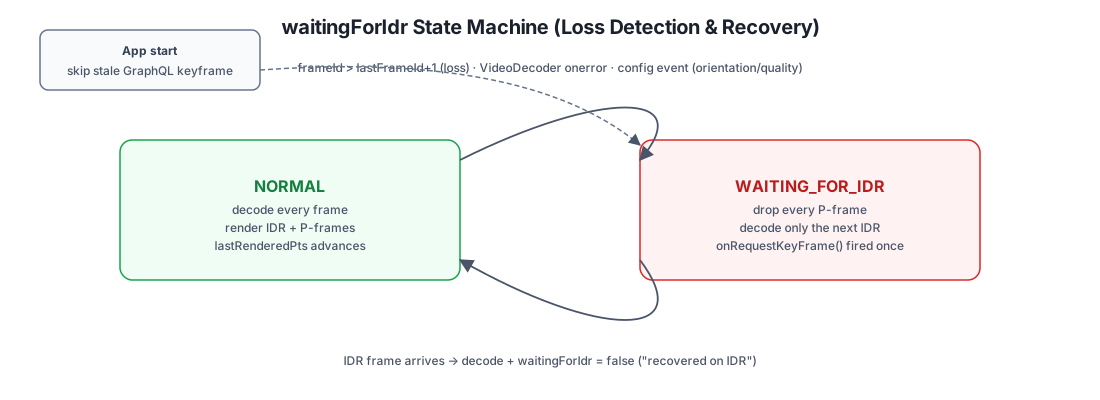
| State | Behavior |
|---|---|
NORMAL | Decode all frames normally |
WAITING_FOR_IDR | Drop all P-frames, only decode IDR frames; reset to NORMAL when IDR arrives |
Scenarios that trigger the transition into WAITING_FOR_IDR:
- At startup: skip stale GraphQL keyframe, wait for real IDR
- On packet loss: drop undecodable P-frames, wait for IDR recovery
- On decoder error: reset decoder, wait for IDR
- On config change: drop residual P-frames after orientation/quality change
Decoder Error Recovery
When VideoDecoder.onerror fires, decoderNeedsReset = true is set in the pipeline layer (screen-mirror-pipeline.ts). On the next IDR frame, the decoder is reconfigured with the cached SPS/PPS instead of round-tripping to GraphQL again:
if (decoderNeedsReset) {
    if (!packet.isKeyFrame || !cachedConfig) return
    video.configure(cachedConfig)
    decoderNeedsReset = false
}
Backpressure and Timestamp Deduplication
If decoder.decodeQueueSize > 5, incoming P-frames are dropped rather than queued — the threshold of 5 (rather than 2) tolerates hardware decoder startup latency without causing unnecessary stutter. Separately, after rendering, lastRenderedPts is recorded; a frame whose timestamp is older (out-of-order arrival) is dropped unless it's a keyframe:
if (packet.timestamp < this.lastRenderedPts && !packet.isKeyFrame) {
    return
}
Orientation Change Handling
Encoder Rebuild
An OrientationEventListener in ScreenMirrorService compares the display's rotation against the cached isPortrait flag on every sensor callback; only a genuine portrait/landscape flip calls pipeline.onOrientationChanged() and invalidates the accessibility screen-size cache used for touch coordinate scaling.
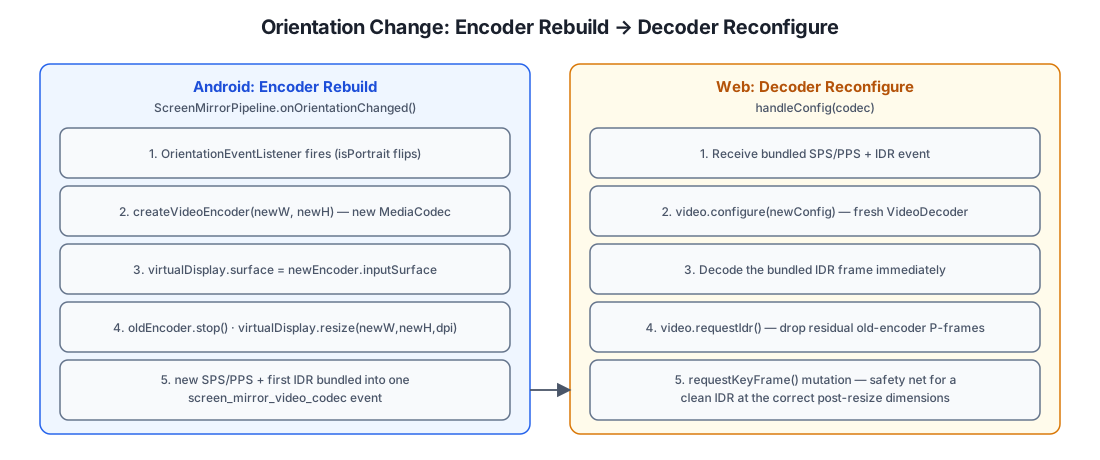
rebuildEncoderAndResize():
- Create a new encoder at the new dimensions (e.g. landscape 1920×1080)
- Switch
VirtualDisplay.surfaceto the new encoder's inputSurface - Stop the old encoder
VirtualDisplay.resize()to the new dimensions
Surface switch happens before resize — ensuring the new encoder receives frames first, and the old encoder is stopped before it can receive wrong-dimension frames. If virtualDisplay?.surface = ... throws, the rebuild aborts and keeps the old encoder running rather than leaving the pipeline with no encoder at all.
Config Change Notification
When the new encoder first outputs SPS/PPS, pendingConfigBroadcast is set on the pipeline. When the first IDR from the new encoder arrives, it's bundled with that config into a single screen_mirror_video_codec event instead of being sent as an ordinary video packet.
The web client then, in handleConfig():
- Reconfigures the decoder with the new SPS/PPS
- Decodes the bundled IDR frame immediately
- Calls
video.requestIdr()to drop any residual P-frames from the old encoder still in flight - Calls
requestKeyFrame()to request a clean, fresh IDR
Steps 3-4 are a safety net — even if the new encoder's first IDR has incorrect dimensions (during the async resize window), the web client quickly recovers to the correct dimensions. handleConfig() also short-circuits if the incoming config is byte-identical to the cached one, since reconfiguring the decoder with unchanged bytes is a no-op that still costs an IDR to recover from.
System MediaProjection Lifecycle
The Problem
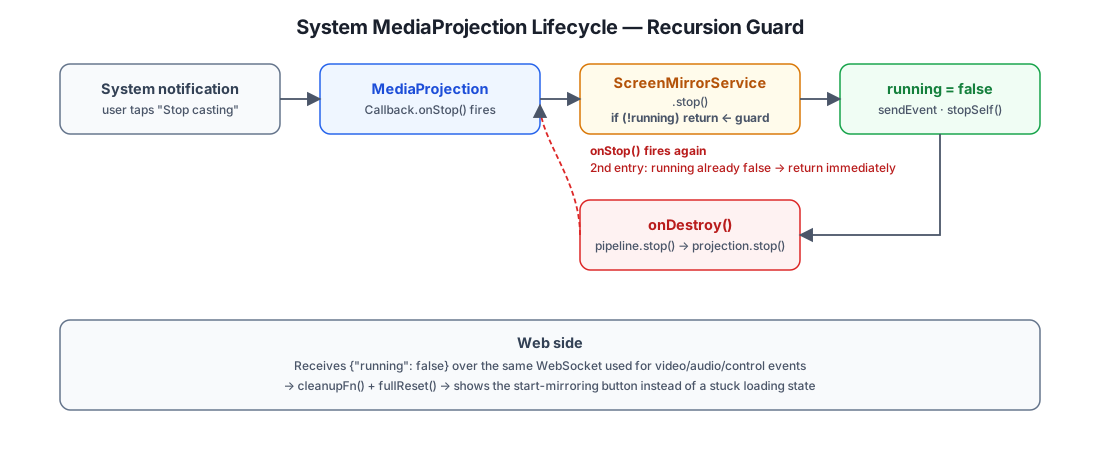
Users may close the system-level screen cast (MediaProjection) via the Android system notification bar, rather than through the app's UI. In this case, ScreenMirrorService doesn't know casting has stopped — running remains true, the web client queries screenMirrorState and gets true, but no video frames arrive, and the page is stuck on loading.
MediaProjection.Callback
MediaProjection provides a Callback.onStop() callback that fires when the system stops casting. ScreenMirrorPipeline.startEncoders() registers this callback and calls ScreenMirrorService.instance?.stop() in onStop():
projection.registerCallback(object : MediaProjection.Callback() {
    override fun onStop() {
        ScreenMirrorService.instance?.stop()
    }
}, null)
Service.stop() Responsibilities
stop() is the explicit stop point, responsible for notifying the web client and stopping the service:
fun stop() {
    if (!running) return  // prevent recursion
    running = false
    sendEvent(WebSocketEvent(EventType.SCREEN_MIRRORING, """{"running":false}"""))
    stopForeground(STOP_FOREGROUND_REMOVE)
    stopSelf()
}
The if (!running) return guard prevents recursion: onStop() → stop() → stopSelf() → onDestroy() → pipeline.stop() → projection.stop() → onStop() → stop() (at this point running=false, returns immediately).
Web-Side Handling
When the web client receives the {"running":false} event, it resets to idle state and shows the start button:
const onScreenMirroring = (data: any) => {
    if (data?.running === false) {
        cleanupFn()
        fullReset()
        return
    }
    // running=true → connect to stream
}
Remote Control: Touch Injection
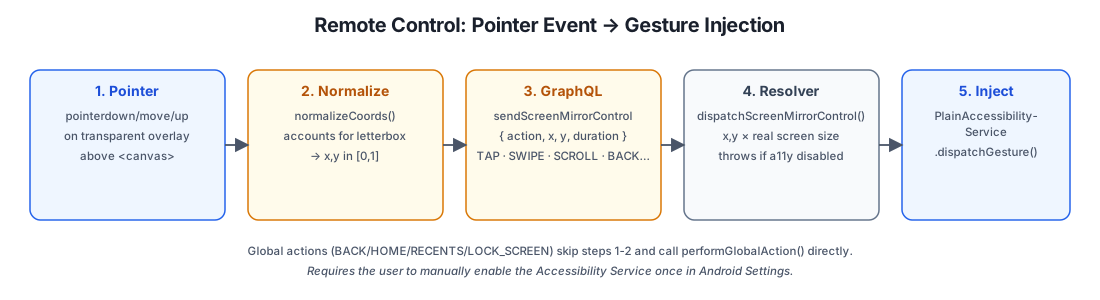
Screen mirroring is one-way by default (video/audio only); remote control is opt-in and requires the user to enable PlainApp's Accessibility Service once, since Android has no public API for injecting arbitrary touch events outside of AccessibilityService.dispatchGesture().
Coordinate Normalization (Web)
A transparent overlay sits above the <canvas> and captures pointer events. normalizeCoords() converts a raw clientX/clientY into [0,1] coordinates relative to the actual video content area — not the overlay's bounding box — by computing the letterbox/pillarbox offset from the canvas's backing-store aspect ratio vs. its rendered container aspect ratio:
if (videoAspect > containerAspect) {
    // Letterboxed top/bottom
    renderW = containerW
    renderH = containerW / videoAspect
    offsetY = (containerH - renderH) / 2
} else {
    // Pillarboxed left/right
    renderH = containerH
    renderW = containerH * videoAspect
    offsetX = (containerW - renderW) / 2
}
A pointer press starts a GestureState that tracks start position/time; a 500ms hold with < 10px movement escalates to LONG_PRESS, movement past that threshold becomes a SWIPE, and a quick release is a TAP. A visual touch indicator (a growing/fading dot) gives the operator feedback on what gesture was recognized, before the phone even responds.
GraphQL → AccessibilityService
Every recognized gesture is sent as one sendScreenMirrorControl(input) mutation carrying an action (TAP/LONG_PRESS/SWIPE/SCROLL/BACK/HOME/RECENTS/LOCK_SCREEN/KEY) plus normalized coordinates. The resolver calls dispatchScreenMirrorControl(), which multiplies the normalized coordinates by the real screen size (from PlainAccessibilityService.getScreenSize(), invalidated on every orientation change) and delegates to PlainAccessibilityService.dispatchControl():
private fun dispatchTap(x: Float, y: Float) {
    val path = Path().apply { moveTo(x, y) }
    val stroke = GestureDescription.StrokeDescription(path, 0, 50)
    dispatchGesture(GestureDescription.Builder().addStroke(stroke).build(), null, null)
}
SWIPE and LONG_PRESS build the same GestureDescription with a longer stroke duration or a line path instead of a single point; SCROLL is implemented as a synthetic swipe from (x, y) to (x, y + deltaY) clamped to ±500px. The four global actions (BACK/HOME/RECENTS/LOCK_SCREEN) skip gesture dispatch entirely and call performGlobalAction() directly. If the Accessibility Service isn't enabled, the resolver throws a GraphQLError rather than silently dropping the input, so the web UI can prompt the user to enable it.
Audio Pipeline
Android Opus Encoding
MediaCodecAudioEncoder uses AudioPlaybackCaptureConfiguration (built from the same MediaProjection) to capture system audio via AudioRecord, feeding raw PCM into a MediaCodec Opus encoder. This requires Android 10+ and the RECORD_AUDIO permission — on older devices or without the permission, start() logs a warning and skips audio entirely (video keeps working). Encoded Opus packets are wrapped in the same VideoPacket protocol (with FLAG_AUDIO set) and share the video packet's SCREEN_MIRROR_AUDIO WebSocket channel.
Web Opus Decoding
ScreenMirrorAudioPipeline uses WebCodecs AudioDecoder to decode Opus data, outputting AudioData routed to an <audio> element. Audio frame timestamp is used for A/V sync — sharing the same time base (encoder PTS, in microseconds) as video frames, so no separate clock negotiation is needed between the two streams.
Performance Optimizations
Zero-Copy Paths
| Path | Method |
|---|---|
| VirtualDisplay → encoder Surface | GPU direct, Surface passthrough |
| VideoDecoder → VideoFrame → WebGL texture | gl.texImage2D(VideoFrame), GPU direct |
| WebSocket receive → VideoPacket parse | Uint8Array.subarray() is a view, no copy |
avccToAnnexB Optimization
Some Android encoders output AVCC format (4-byte length prefix), which needs conversion to Annex-B format (00 00 00 01 start code) for WebCodecs decoding.
The early implementation used ArrayList<Byte> with per-byte boxing — a 50KB IDR frame produced 50,000 java.lang.Byte boxing operations, creating massive GC pressure. The optimization uses two-pass scan + copyInto (which maps to the System.arraycopy intrinsic on JVM):
// First pass: compute output size
var outSize = 0
// Second pass: bulk copy
val out = ByteArray(outSize)
avcc.copyInto(out, writeOff + 4, off + 4, off + 4 + len)
P-Frame Drop Strategy
The decoder may be slow during initialization. If the P-frame queue is too long, latency accumulates. The decode queue size threshold is set to > 5 (rather than > 2) to avoid excessive frame loss during hardware decoder initialization.
IDR Request Deduplication
The waitingForIdr guard ensures only one IDR request per loss event, preventing duplicate requests while waiting for an IDR to arrive.
Design Patterns Recap
| Pattern | Where | Why |
|---|---|---|
| State Machine | waitingForIdr flag | Explicit P-frame drop/recovery state transitions |
| Recursion Guard | if (!running) return in stop() | Prevents onStop → stop → onDestroy → pipeline.stop → projection.stop → onStop recursion |
| Zero-Copy Pipeline | VideoFrame → gl.texImage2D | GPU direct texture upload, no CPU copy |
| Two-Pass Scan | avccToAnnexB | Pre-compute size, single allocation + bulk copy, eliminates boxing |
| Bundled Event | SPS/PPS + IDR in one event | Config change completes reconfiguration + first-frame decode in one event |
| Callback Separation | onFirstFrameRendered vs onDisconnected vs onScreenMirrorOff | Clear distinction between first-frame render, transport failure, and phone-side stop |
| Safety Net | requestIdr() + requestKeyFrame() | Drop residual frames + request clean IDR after config change |
| PTS Deduplication | timestamp < lastRenderedPts | Drop out-of-order frames |
| FrameId Gap | frameId > lastFrameId + 1 | ACK-free packet loss detection |
| desynchronized Context | WebGL2 desynchronized: true | Bypass compositor, save 1 frame of latency |
| Explicit Fail Fast | sendScreenMirrorControl throws GraphQLError | Surfaces "accessibility disabled" instead of silently dropping input |
Further Reading
- WebCodecs API — MDN documentation covering the
VideoDecoder/AudioDecoderinterfaces.