DLNA (built on UPnP AV) is the protocol behind "Cast to TV" buttons on
smart TVs. It runs entirely on the local network, with no cloud account
and no pairing step. PlainApp implements both directions of it: it
can push a local video, song, or photo to any DLNA-compatible smart TV,
and it can turn the phone itself into a MediaRenderer so a TV remote
app, VLC, or another PlainApp can cast to it.
This article covers the wire protocol (SSDP + SOAP + DIDL-Lite), the local HTTP server that streams media with the headers TVs actually require, the GENA event subscription for playback state, and the sender-IP trust model that keeps an unauthenticated 1990s-era protocol safe to run on a modern phone.
Table of Contents
- Table of Contents
- High-Level Architecture
- SSDP Discovery: Finding Devices Without a Server
- AVTransport Control: The SOAP Protocol
- DIDL-Lite Metadata and the Double-Escaping Quirk
- Serving Media to the TV: Range Requests & DLNA Headers
- GENA Events: Playback State Callbacks
- Receiver Mode: Becoming a UPnP MediaRenderer
- Security: Sender Trust via Allow/Deny Lists
- Platform Split: commonMain Orchestration, androidMain Sockets
- Pure-Kotlin Engineering Notes
- Design Patterns Recap
- Further Reading
High-Level Architecture
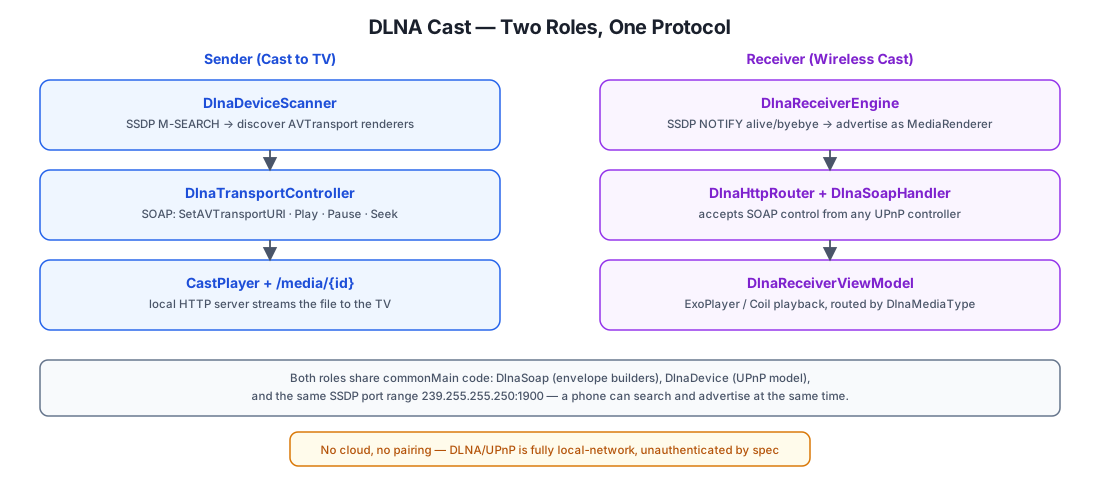
DLNA/UPnP AV has no central server and no cloud component — everything happens over local-network UDP multicast (discovery) and HTTP (control + media). PlainApp implements two independent roles that happen to share the same commonMain protocol code:
| Role | What it does | Key classes |
|---|---|---|
| Sender ("Cast to TV") | Scans for renderers, tells one to fetch a URL, controls playback | DlnaDeviceScanner, DlnaTransportController, CastPlayer |
| Receiver ("Wireless Cast") | Advertises itself as a MediaRenderer, accepts control from any UPnP controller | DlnaReceiverEngine, DlnaHttpRouter, DlnaSoapHandler, DlnaReceiverViewModel |
Both roles reuse DlnaSoap (SOAP envelope builders) and DlnaDevice (the
UPnP device model) from features/dlna/common/. The DLNA specification
has no authentication of any kind — anyone on the LAN who knows a
renderer's control URL can send it commands. This shapes almost every
design decision described below, especially the receiver's trust model.
SSDP Discovery: Finding Devices Without a Server
Discovery uses SSDP (Simple Service Discovery Protocol), a thin layer
over UDP multicast to 239.255.255.250:1900. There is no directory
server — devices announce themselves and answer search queries directly.
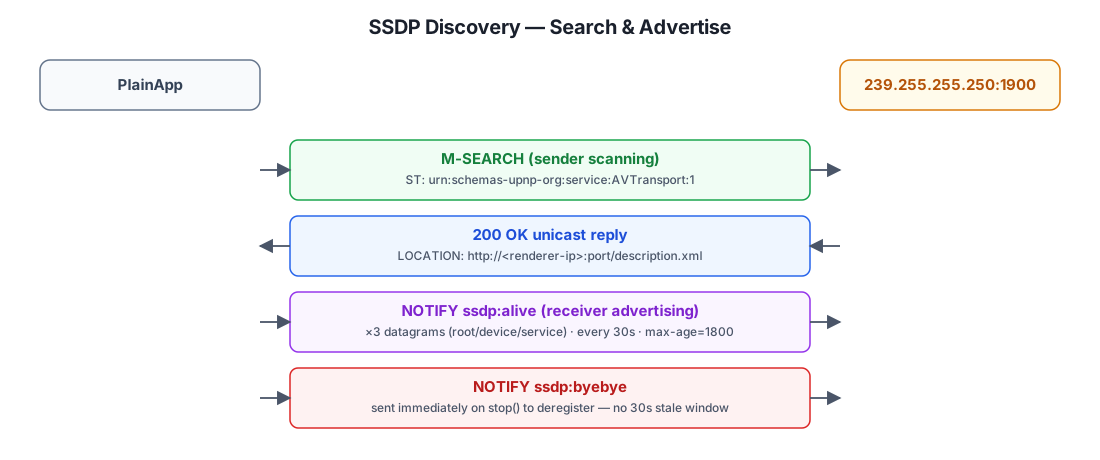
As a sender, DlnaDeviceScanner broadcasts an M-SEARCH datagram
targeting urn:schemas-upnp-org:service:AVTransport:1 and collects
unicast 200 OK replies, each carrying a LOCATION header pointing at
the renderer's description.xml. The scanner de-duplicates by
hostAddress — it doesn't parse the device XML itself; that's left to
CastViewModel.searchAsync(), which fetches LOCATION, calls
device.update(xml), and only surfaces devices where
device.isAVTransport() returns true:
fun search(): Flow<DlnaDevice> = searchDlnaDevicesRaw().transform { ssdp ->
    if (devices.none { it.hostAddress == ssdp.hostAddress }) {
        val device = DlnaDevice(ssdp.hostAddress, ssdp.header)
        devices.add(device)
        emit(device)
    }
}
As a receiver, DlnaReceiverEngine.runSsdpLoop() sends three
NOTIFY ssdp:alive datagrams on start (root device, MediaRenderer:1
device type, AVTransport:1 service type), re-announces every 30 seconds
(CACHE-CONTROL: max-age=1800), and answers incoming M-SEARCH requests
with unicast responses. On stop(), it sends ssdp:byebye immediately
rather than waiting for the 30-minute cache to expire — so a TV remote
app stops listing PlainApp the moment "Wireless Cast" is turned off.
Port fallback
The receiver's HTTP server tries port 7878 first, then 7879, then
7880, preferring whichever port worked last time:
private val CANDIDATE_PORTS = listOf(7878, 7879, 7880)
private fun openServerSocket(): DlnaServerSocket? {
    val candidates = lastPort
        ?.let { listOf(it) + CANDIDATE_PORTS.filter { p -> p != it } }
        ?: CANDIDATE_PORTS
    for (port in candidates) {
        val ss = createDlnaServerSocket(port)
        if (ss != null) return ss
    }
    return null
}
If all three ports are taken (rare, but possible with other DLNA apps
running), startError is set and surfaced in the UI rather than failing
silently.
AVTransport Control: The SOAP Protocol
Once a renderer is found, playback is controlled through UPnP
AVTransport, a SOAP-over-HTTP service. Every action is a POST to the
renderer's control URL with a SOAPAction header and an XML body wrapped
in a SOAP envelope.
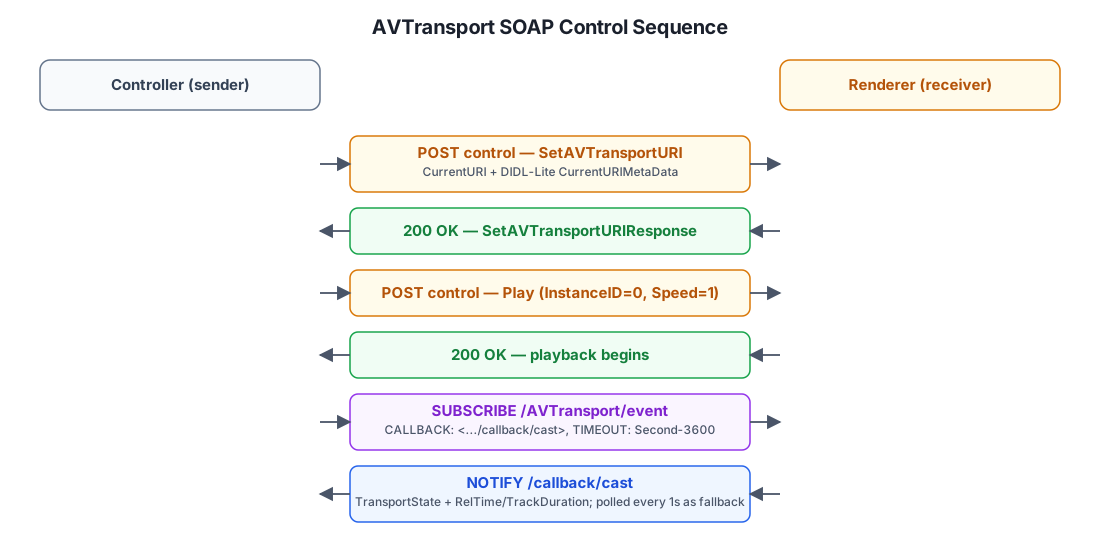
DlnaTransportController builds each request with a shared helper:
private suspend fun executeAVTransportCommand(
    device: DlnaDevice,
    action: String,
    parameters: String = "<InstanceID>0</InstanceID>",
): String {
    val st = device.getAVTransportService()?.serviceType ?: return ""
    return executeSOAPRequest(device, action, "<u:$action xmlns:u=\"$st\">$parameters</u:$action>")
}
executeSOAPRequest sets SOAPAction: "<serviceType>#<action>" and posts
DlnaSoap.requestEnvelope(soapBody) — the same envelope constants used by
the receiver side to build responses, so the wire format only needs to be
defined once in commonMain.
The receiver's DlnaHttpRouter.handleSoap() mirrors this on the other
end: it reads the soapaction header, extracts the action name after the
#, and dispatches on it —SetAVTransportURI, Play, Pause, Stop,
Seek, GetTransportInfo, GetPositionInfo, GetMediaInfo,
GetDeviceCapabilities. RenderingControl (volume) is stubbed with a
static 100 — PlainApp doesn't expose device volume through UPnP.
DIDL-Lite Metadata and the Double-Escaping Quirk
SetAVTransportURI carries two parameters: CurrentURI (the media URL)
and CurrentURIMetaData — a DIDL-Lite XML fragment describing the
title, media class, and album art, embedded as an XML-escaped string
inside the outer SOAP body:
private fun buildDidlLiteMetadata(mediaUrl: String, title: String, albumArtUri: String): String {
val upnpClass = when {
ext in setOf("mp3", "m4a", "flac", ...) -> "object.item.audioItem.musicTrack"
ext in setOf("jpg", "jpeg", "png", ...) -> "object.item.imageItem"
else -> "object.item.videoItem"
}
val didl = """<DIDL-Lite xmlns="..."><item id="0" parentID="-1" restricted="0">
<dc:title>$escapedTitle</dc:title><upnp:class>$upnpClass</upnp:class>$albumArtTag</item></DIDL-Lite>"""
return didl.replace("&", "&").replace("<", "<").replace(">", ">")
}
The DIDL-Lite XML is escaped twice: once for the title text itself
(so a song called Fire & Ice doesn't break the DIDL-Lite tags), and once
for the entire DIDL-Lite document (so its own </> don't break the
outer SOAP envelope it's embedded in as text). This is a well-known
UPnP quirk, not a bug — CurrentURIMetaData is defined as string content,
not as nested XML elements.
On the receiver side, DlnaSoapHandler reverses this: parseSoapAction
un-escapes the SOAP body once to get the DIDL-Lite text, then
extractTitleFromDidlMeta/extractMediaTypeFromDidlMeta/
extractAlbumArtUriFromDidlMeta each do a second pass of entity
unescaping and tag extraction on that inner string:
fun extractMediaTypeFromDidlMeta(meta: String, fallbackUri: String = ""): DlnaMediaType {
    val cls = meta.substring(classStart + 12, classEnd).lowercase()
    return when {
        "audioitem" in cls || "musictrack" in cls -> DlnaMediaType.AUDIO
        "imageitem" in cls || "photo" in cls -> DlnaMediaType.IMAGE
        "videoitem" in cls -> DlnaMediaType.VIDEO
        else -> DlnaMediaType.UNKNOWN
    }
}
If <upnp:class> is missing (some senders omit it), cleanMediaTitle()
falls back to the file extension of the URI itself — media type
detection never hard-fails, it just degrades to UNKNOWN which routes to
the video player as a safe default.
Serving Media to the TV: Range Requests & DLNA Headers
A SetAVTransportURI call only tells the renderer where to fetch the
media from — the actual bytes are served by PlainApp's own local HTTP
server, at /media/{id}.
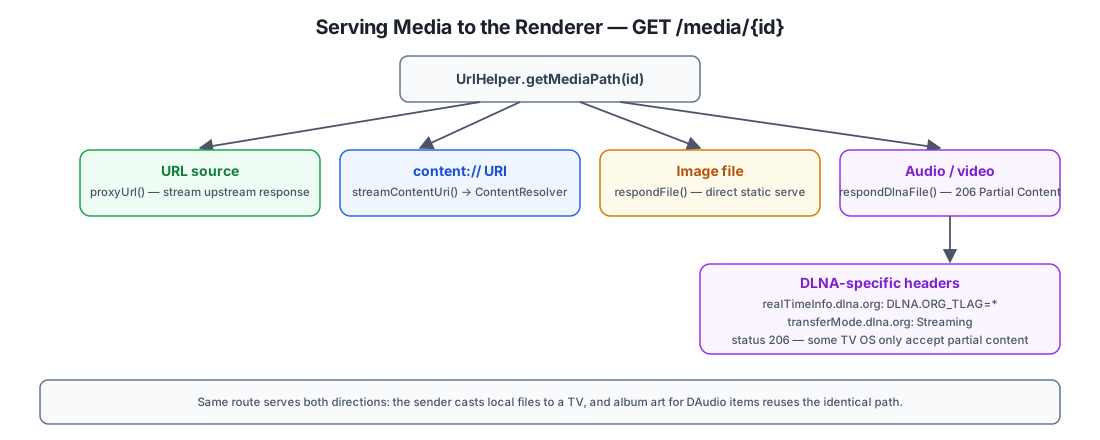
UrlHelper.getMediaHttpUrl(path) registers the real path (which might be
a content:// URI, a remote URL, or a plain file path) under a short id
and returns http://<device-ip>:<port>/media/<id>.<ext>. The route then
branches on what kind of source it actually is:
when {
    path.isUrl() -> call.proxyUrl(path)                 // remote URL: stream upstream response
    isContentUri(path) -> call.respondStream { sink -> streamContentUri(path, sink) }
    path.isImageFast() -> call.respondFile(path)         // images: plain static serve
    else -> call.respondDlnaFile(path)                   // audio/video: DLNA-aware serving
}
respondDlnaFile is the interesting case — many smart TVs and DLNA
renderers refuse to play a stream unless it looks like a proper DLNA
media server response:
override suspend fun respondDlnaFile(path: String): Boolean {
    val file = java.io.File(path)
    if (!file.exists()) return false
    applicationCall.response.run {
        header("realTimeInfo.dlna.org", "DLNA.ORG_TLAG=*")
        header("contentFeatures.dlna.org", "")
        header("transferMode.dlna.org", "Streaming")
        header("Connection", "keep-alive")
        header("Server", "DLNADOC/1.50 UPnP/1.0 Plain/1.0 Android/${android.os.Build.VERSION.RELEASE}")
        status(HttpStatusCode.PartialContent) // some TV OS only accept 206
    }
    applicationCall.respond(LocalFileContent(file))
    return true
}
Note the status is always 206 Partial Content, not 200 OK — some TV
firmware treats a plain 200 response as "not seekable" and refuses to
play it, even for a full-file GET. This one status-code choice is the
difference between "plays fine" and "TV shows a spinner forever" on
several real devices.
The same route serves album art for cast audio items too:
UrlHelper.getAlbumArtHttpUrl() maps a content://media/.../albumart/<id>
URI into the identical /media/{id} path, so content:// streaming and
DLNA file serving share one code path regardless of whether the "media"
in question is the song or its cover image.
GENA Events: Playback State Callbacks
After starting playback, the sender subscribes to the renderer's AVTransport eventing service (GENA — General Event Notification Architecture) so it learns about state changes without polling:
suspend fun subscribeEvent(device: DlnaDevice, callbackUrl: String): String {
    val service = device.getAVTransportService() ?: return ""
    val response = createHttpClient().subscribe(baseUrl + eventSubURL) {
        headers { set("NT", "upnp:event"); set("TIMEOUT", "Second-3600"); set("CALLBACK", "<$callbackUrl>") }
    }
    return response.headers["SID"].orEmpty()
}
SUBSCRIBE/RENEW/UNSUBSCRIBE are custom HTTP methods (not in the
standard verb set), handled via Ktor's generic HttpMethod("SUBSCRIBE")
request builder. The renderer then NOTIFYs
callbackUrl — PlainApp's own /callback/cast route — whenever
transport state, position, or duration changes:
if (xml.contains("TransportState val=\"STOPPED\"") && !xml.contains("AVTransportURIMetaData")) {
    // advance to next playlist item
} else if (xml.contains("TransportState val=\"PLAYING\"")) {
    CastPlayer.isPlaying.value = true
}
The duplicate-callback guard
Some renderers send two NOTIFY callbacks in quick succession for the
same STOPPED transition — the second one happens to carry
AVTransportURIMetaData while the first doesn't. Advancing the playlist
on both would skip a track every time playback naturally stops. The
!xml.contains("AVTransportURIMetaData") check is a deliberate,
narrow filter: only the first STOPPED notification (without metadata)
triggers auto-advance. A startPositionUpdater() job also polls
GetPositionInfo every second as a fallback, since PlainApp's own
SUBSCRIBE acknowledgment doesn't push events back to other
controllers — only the sender side consumes GENA callbacks from TVs.
Receiver Mode: Becoming a UPnP MediaRenderer
Flip the direction: any DLNA controller (a TV remote app, VLC, another
PlainApp) can push media to the phone itself. DlnaReceiverEngine opens
the same kind of HTTP + SSDP server described above, but as the
MediaRenderer being controlled rather than the controller.
DlnaHttpRouter.route() serves description.xml (built by
DlnaXmlTemplates.deviceDescription(), listing an AVTransport and a
stub RenderingControl service) and dispatches SOAP actions to
DlnaSoapHandler. A SetAVTransportURI call doesn't play anything
immediately — it stores a PendingCastRequest and waits:
if (uri.isNotEmpty()) {
    DlnaRendererState.rawPendingCastRequest.value =
        PendingCastRequest(senderIp, senderName, uri, title, mediaType, albumArtUri)
    DlnaRendererState.pendingPlayQueued.value = false
}
A Play that arrives before the pending request is resolved doesn't
start playback either — it sets pendingPlayQueued = true so the command
replays automatically once the cast request is accepted, instead of being
silently lost:
val hasPending = DlnaRendererState.rawPendingCastRequest.value != null ||
    DlnaRendererState.pendingCastRequest.value != null
if (hasPending) {
    DlnaRendererState.pendingPlayQueued.value = true
} else {
    DlnaRendererState.commandChannel.trySend(DlnaCommand.Play)
}
Accepted commands flow through a single Channel<DlnaCommand> that
DlnaReceiverViewModel drains, decoupling the raw socket-handling
coroutine from UI/player state — the HTTP handler never touches
ExoPlayer directly. Playback then routes to one of three full-screen
composables by DlnaMediaType: DlnaReceiverAudioPlayerContent (gradient
background, album art, seek bar), an image viewer, or
DlnaReceiverVideoPlayerContent (ExoPlayer).
Security: Sender Trust via Allow/Deny Lists
DLNA has no authentication by design — any device on the LAN can send
a renderer a SetAVTransportURI. Turning a personal phone into an
unauthenticated MediaRenderer would let anyone on the same Wi-Fi (a
shared office network, a friend's house, a hostile guest network) push
arbitrary media URLs to it. PlainApp closes this gap with a
per-sender-IP trust list, gating every incoming cast request:
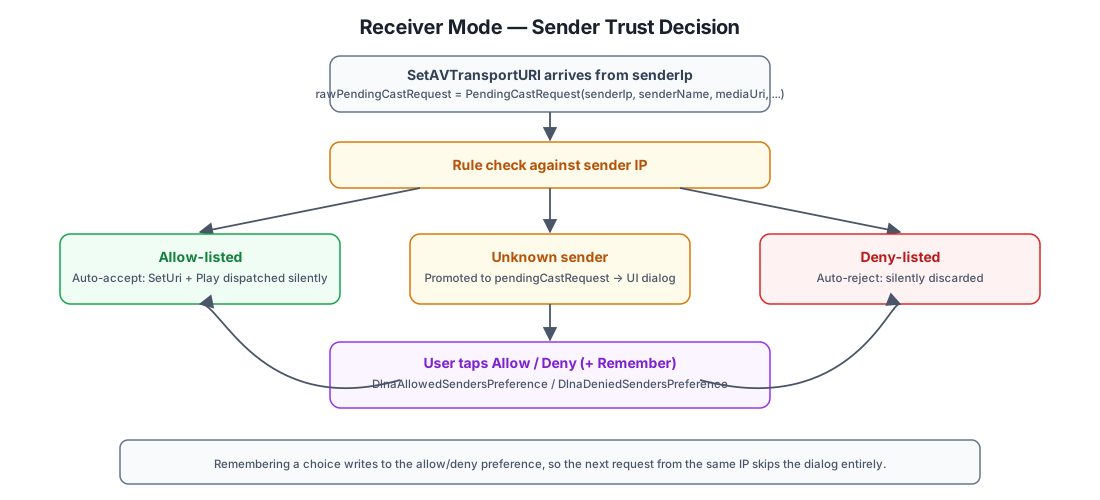
DlnaRendererState.rawPendingCastRequest.filterNotNull().collect { pending ->
    val allowed = DlnaAllowedSendersPreference.getAsync()
    val denied = DlnaDeniedSendersPreference.getAsync()
    when {
        DlnaAllowedSendersPreference.containsIp(allowed, pending.senderIp) -> {
            // Auto-accept: send commands directly without showing a dialog
        }
        DlnaDeniedSendersPreference.containsIp(denied, pending.senderIp) -> {
            // Auto-reject: silently discard
        }
        else -> {
            // Unknown sender: promote to UI-visible state for the user to decide
            DlnaRendererState.pendingCastRequest.value = pending
        }
    }
}
An unknown sender's cast request surfaces a confirmation dialog with an
optional "remember this choice" flag; choosing to remember writes the
sender's IP to the allow or deny preference so future requests from the
same address skip the dialog. This is enforced entirely in
DlnaReceiverViewModel, above the wire protocol — the SOAP handler
itself always returns 200 OK regardless of the trust decision (per the
UPnP spec, the transport call succeeded; whether the media actually
plays is a separate, local decision).
Platform Split: commonMain Orchestration, androidMain Sockets
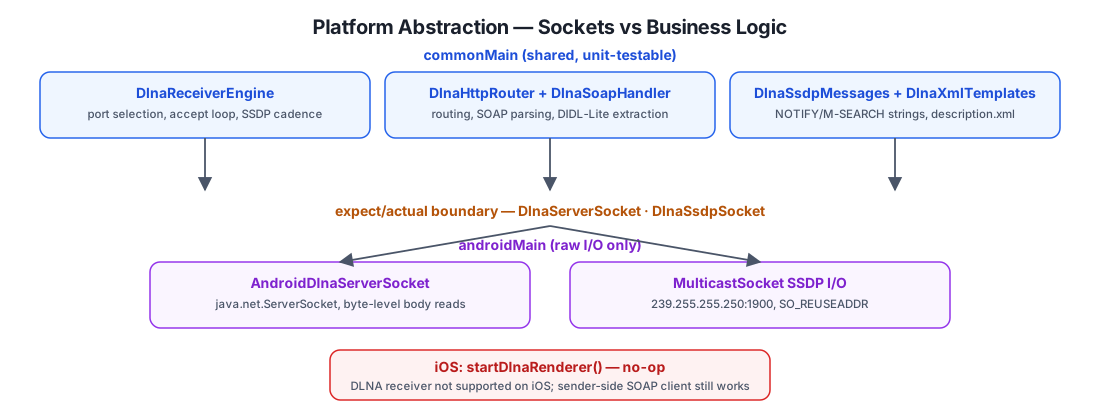
Following the same pattern as PlainApp's other network features, only the
raw byte-level socket I/O is platform-specific. DlnaServerSocket and
DlnaSsdpSocket are expect interfaces; Android's actual
implementations wrap java.net.ServerSocket and java.net.MulticastSocket
directly. Everything else — port selection, the SSDP alive/byebye
cadence, HTTP routing, SOAP parsing, DIDL-Lite metadata, and all four
DlnaCommand state transitions — lives in commonMain and is unit
testable on the JVM without an Android device.
iOS gets sender-side SOAP control (it's a plain HTTP client, no sockets to implement), but the receiver is a deliberate no-op:
actual fun startDlnaRenderer() {}
iOS doesn't expose a way to run a background UDP multicast listener
reliably enough to be a good MediaRenderer citizen, so "Wireless Cast"
(receiving) is Android-only; "Cast to TV" (sending) works on both.
Pure-Kotlin Engineering Notes
A few implementation details exist specifically to avoid platform dependencies that would break Kotlin Multiplatform sharing:
- UUID v4 generation.
DlnaReceiverEngine.randomUuid()hand-rolls an RFC 4122 v4 UUID fromRandom.nextBytes(16)instead ofjava.util.UUID.randomUUID(), so the device identity generator is identical on every platform. - Percent-decoding.
DlnaSoapHandler's privatepercentDecode()replacesjava.net.URLDecoder.decode()for titles that arrive URL-encoded in a media URI. - Byte-level HTTP body reads.
Content-Lengthis a byte count, not a character count.AndroidDlnaClientConnection.readHttpRequest()reads the body viareadBodyBytes(bis, contentLength)against the rawBufferedInputStream, never aBufferedReader/CharArray— a title containing multi-byte UTF-8 (e.g. Chinese characters, 3 bytes each) would otherwise under-read the body and stall waiting for bytes that already arrived, silently breakingSetAVTransportURIfor non-ASCII titles. - Base URL parsing without
java.net.URL.DlnaDevice.getBaseUrl()extracts the scheme/host/port from aLOCATIONheader with plain string slicing (substringAfter("://"),substringBefore('/')) instead of constructing ajava.net.URL.
Design Patterns Recap
| Pattern | Where | Why |
|---|---|---|
| Shared Protocol, Split I/O | DlnaSoap/DlnaXmlTemplates in commonMain, sockets in androidMain | Wire format defined once, platform only supplies bytes in/out |
| Pending → Rule Check → Promote | rawPendingCastRequest → pendingCastRequest | Separates "a request arrived" from "a request needs a human decision" |
| Command Queue Decoupling | Channel<DlnaCommand> | HTTP handler coroutine never touches ExoPlayer/UI state directly |
| Queued-Command Replay | pendingPlayQueued | A Play that races ahead of SetAVTransportURI's approval isn't dropped |
| Deliberate Status Code | respondDlnaFile → always 206 | Matches what real TV firmware expects, not just spec-minimum 200 |
| Narrow Duplicate Filter | !xml.contains("AVTransportURIMetaData") | Distinguishes the two STOPPED callbacks some renderers send, without a generic dedup mechanism |
| Immediate Byebye | stop() sends ssdp:byebye before cancel | Avoids a stale 30-minute SSDP cache entry after the user turns the feature off |
| Fail-Open on Unknown, Fail-Closed by Default | allow/deny preference + dialog | Neither auto-trusts nor auto-blocks a first-time sender — a human decides once |
Further Reading
- UPnP Device Architecture — the underlying SSDP/GENA/SOAP specification.
- For the WebSocket-based low-latency screen mirroring feature (a different, non-DLNA casting path), see Screen Mirror.