
The article covers the Android-only Aware session lifecycle, the publish /
subscribe discovery model, the two-phase role-split handshake that
synchronizes requestNetwork on both sides within the framework's ~500 ms
window, the per-peer link pool with idle sweeping, the IPv6 + custom-DNS
trick that lets a single OkHttp client serve both LAN and Aware, and the
prewarmer that triggers peer Aware startup via BLE.
For the broader fallback chain, see Chat Architecture. For the BLE transport that takes over when Aware is unavailable, see BLE Transport. For how the shared ChaCha20 key reused as the Aware PMK is established, see Pairing Flow.
Table of Contents
- Why Wi-Fi Aware?
- Where Aware Sits in the Fallback Chain
- Session Lifecycle: Attach → Publish + Subscribe
- Discovery & Role Assignment
- The Two-Phase Handshake (hello + ready)
- NDP requestNetwork — The 500 ms Window
- Per-Peer Link Pool & Idle Sweeping
- IPv6 Addressing & the
plain-aware-peerDNS Trick - Cryptography: PMK Derivation & ChaCha20 Reuse
- Message Send Path (End-to-End)
- File Download Path (End-to-End)
- Prewarming: BLE-Triggered Aware Startup
- Failure Modes & the Fast-Skip Flag
- Key Constants Reference
- Design Trade-offs Recap
Why Wi-Fi Aware?
Wi-Fi Aware (IEEE 802.11bc, formerly NAN — Neighbor Awareness Networking) is a Wi-Fi Alliance certification that lets two devices discover each other and exchange data without any Wi-Fi infrastructure — no AP, no router, no DHCP. PlainApp uses it for two scenarios that LAN cannot cover:
- Different SSIDs / VLANs. A phone on the guest network and a laptop on the IoT VLAN are both "online" via Wi-Fi but cannot reach each other's IP. Aware creates a direct device-to-device data path that bypasses the infrastructure entirely.
- No infrastructure at all. Two devices in the wilderness with Wi-Fi on but no AP can still chat. (BLE also covers this, but Aware is much faster — ~10 ms round trips vs seconds, and MB/s vs tens of KB/s.)
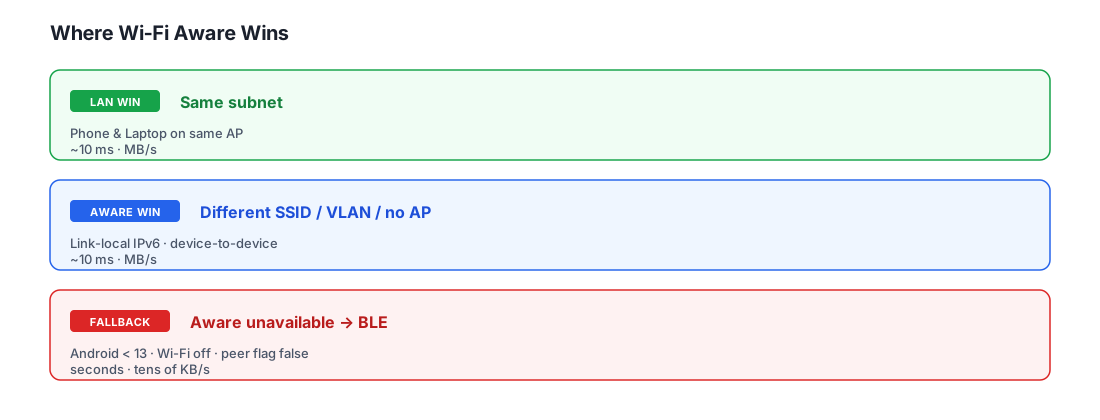
Platform constraints
Wi-Fi Aware is Android-only in PlainApp:
- Android 13 (API 33) is the minimum — the
WifiAwareNetworkSpecifier.BuilderwithsetPort()andsetPmk()overloads that PlainApp depends on requireisTPlus(). - iOS does not expose Wi-Fi Aware to third-party apps. iOS PlainApp falls
directly from LAN to BLE; the
WifiAwareTransportobject is not even compiled into the iOS target (@RequiresApi(Build.VERSION_CODES.S)+ androidMain source set).
This is why the PeerTransportRouter.buildList calls
createWifiAwareTransport() — a factory that returns null on iOS.
Where Aware Sits in the Fallback Chain
PlainApp's PeerTransportRouter is an ordered list. For each send or
downloadFile call, it walks the list and tries each transport until one
succeeds; failures cascade down.
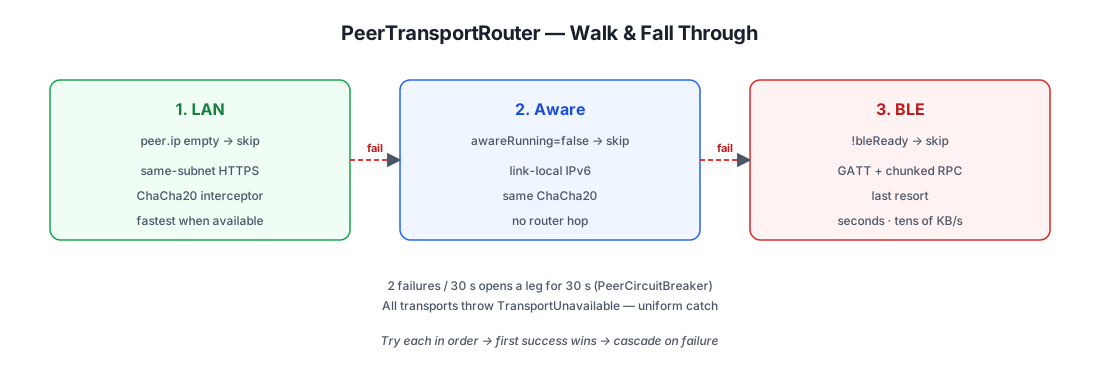
Why is Aware "the middle" and not "the first"?
Because LAN is almost always faster when available. A same-subnet Wi-Fi hop through an AP is a single 802.11 frame exchange; an Aware data path adds an NDP setup (~5 s on first use) plus a second Wi-Fi radio context for the device-to-device link. If both are reachable, LAN wins on latency and throughput.
Conversely, BLE is always slower — but it works whenever both devices are paired. Aware is in the middle: faster than BLE, slower than LAN, and only available on Android 13+ devices with Wi-Fi on.
Session Lifecycle: Attach → Publish + Subscribe
A Wi-Fi Aware session is process-wide. There is exactly one
WifiAwareSession per device; within it, PlainApp runs one publish
session (so peers can discover us) and one subscribe session (so we
can discover peers). Both are started the moment AwareSession.start()
completes the attach callback.
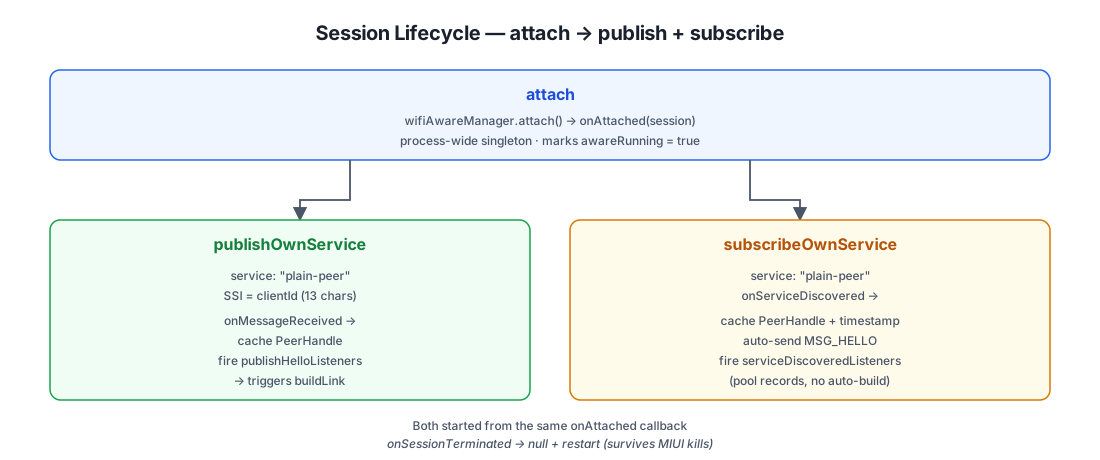
Why publish AND subscribe on the same device?
The Wi-Fi Aware discovery model is asymmetric: a publisher advertises
a service, a subscriber scans for it. To make discovery symmetric (both
devices discover each other), PlainApp does both at once. Without this,
device A would have to know in advance whether it's the publisher or the
subscriber for a given peer — but peer roles are determined later by
clientId comparison (see Discovery & Role Assignment).
Publishing and subscribing simultaneously means each device sees the
other's onServiceDiscovered (as subscriber) AND receives the other's
hello messages (as publisher) — both directions of the handshake are
always available.
Auto-restart on termination
Some Android variants (MIUI in particular) kill long-running Aware
sessions to save battery. PlainApp handles this in the onSessionTerminated
callbacks: it nulls out the terminated session and immediately calls
publishOwnService / subscribeOwnService again on the still-attached
WifiAwareSession. The attach session itself is not lost — only the
publish/subscribe discovery session. Peer handles from before the
termination become stale, which is why awaitPeerHandle checks the
discoveredAt timestamp and discards handles older than 30 s.
Discovery & Role Assignment
The Wi-Fi Aware data-path protocol requires one side to act as the publisher (server) and the other as the subscriber (client). Both sides cannot simultaneously be the initiator — the framework rejects requests without a matching counterpart.
PlainApp assigns roles deterministically per peer using a simple lexicographic comparison of clientIds:
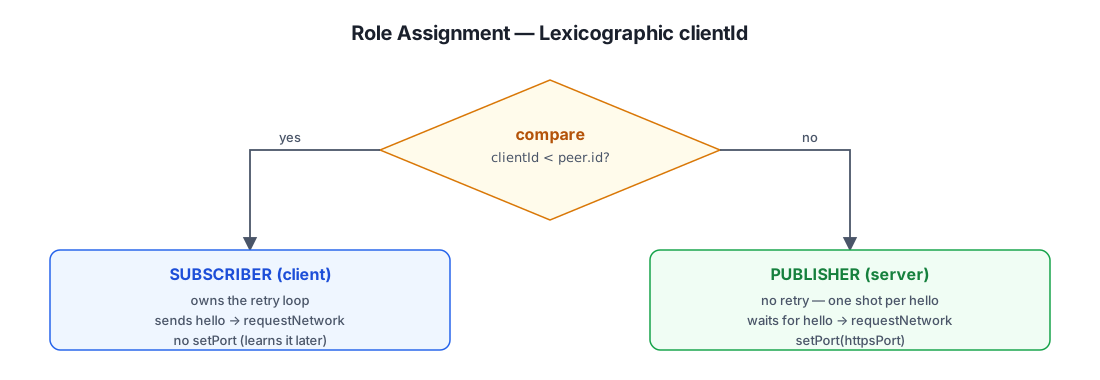
Why deterministic and not negotiated?
A negotiated approach (e.g. "lower MAC is the server") would require an
extra message exchange. The lexicographic comparison is idempotent,
symmetric, and stateless: both devices compute the same role for the
same pair without any communication. The clientId is a 13-character short
UUID, so ties (clientId == peer.id) only happen when comparing a peer to
itself — which never reaches the transport.
The role determines two things downstream:
- Who drives the retry loop. Only the client retries
requestNetwork; the server makes exactly one attempt per hello received. This is critical for the 500 ms window (next section). - Who sets the port. The publisher calls
setPort(httpsPort)because it's the one accepting incoming connections on its HTTPS server port. The subscriber doesn't set a port — it learns the peer's port from theWifiAwareNetworkInfoafter the data path is established.
The Two-Phase Handshake (hello + ready)
The hardest part of Wi-Fi Aware data-path setup is timing. The
framework requires both sides to call connectivityManager.requestNetwork
within roughly 500 ms of each other — if one side calls it before the
other has registered its matching request, the framework rejects it
immediately with onUnavailable ("releaseRequestAsUnfulfillableByAnyFactory").
PlainApp solves this with a two-message application-layer handshake
that runs on top of the Aware L2 message channel (the same sendMessage
API used by onServiceDiscovered):
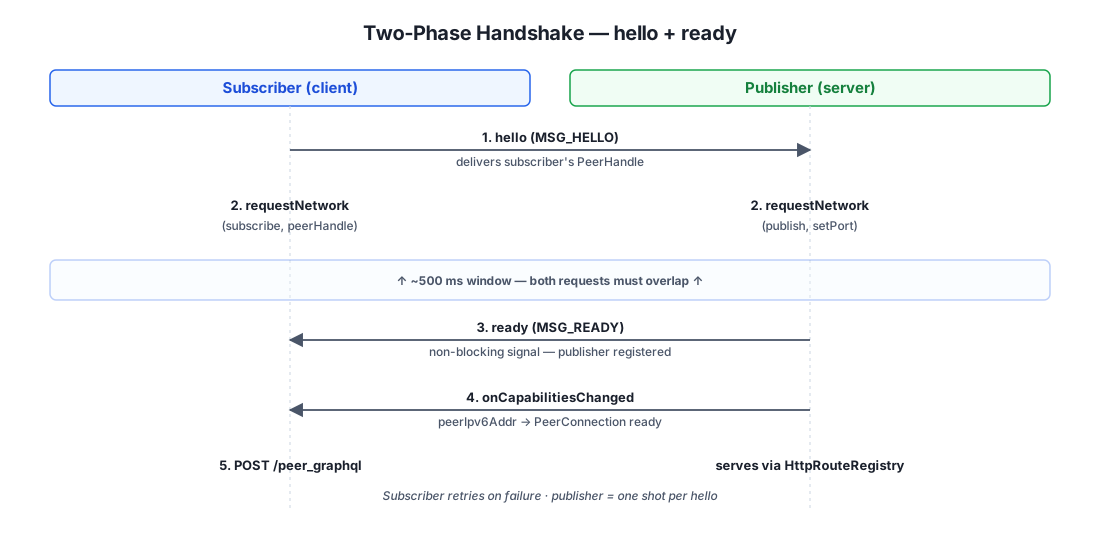
Why two messages (hello + ready) instead of just one?
The hello alone is not enough because of direction asymmetry. The
subscriber can send hello the instant it discovers the publisher (in
onServiceDiscovered), but the publisher cannot start
requestNetwork until it has the subscriber's PeerHandle, which it
only learns by receiving the hello. So the hello serves two purposes:
- Deliver the subscriber's PeerHandle to the publisher. The publisher
needs it to build the
WifiAwareNetworkSpecifier. - Signal intent to connect. Receiving the hello tells the publisher "the subscriber is about to requestNetwork, so I should too."
The ready receipt exists for the opposite direction — to tell the
subscriber "the publisher has registered its requestNetwork." Without it,
the subscriber's requestNetwork might race ahead of the publisher's
and get rejected by the framework. The ready receipt is a non-blocking
signal: the subscriber doesn't wait for it before calling
requestNetwork (that would add a round trip), but if it arrives while
the subscriber is in IDLE state (between retry attempts), the subscriber
can immediately retry without waiting for the RETRY_DELAY_MS gap.
The retry-loop asymmetry
This is the most subtle part of the design. Only the subscriber
retries. The publisher makes exactly one requestNetwork attempt per
hello received. This is because:
- If both sides retried independently, their retry cycles would drift
out of phase (different
delay()durations, different GC pauses), and the tworequestNetworkcalls would rarely overlap inside the 500 ms window. - The subscriber's retry loop sends a fresh hello on each attempt, which
re-triggers the publisher's
buildLinkviapublishHelloListeners. This guarantees the publisher'srequestNetworkalways follows the hello by ~50 ms, well inside the 500 ms window.
This is documented in detail in
AwarePeerLink.build.
NDP requestNetwork — The 500 ms Window
The requestNetwork call is the most timing-sensitive operation in the
Aware transport. Here's what happens on each side:
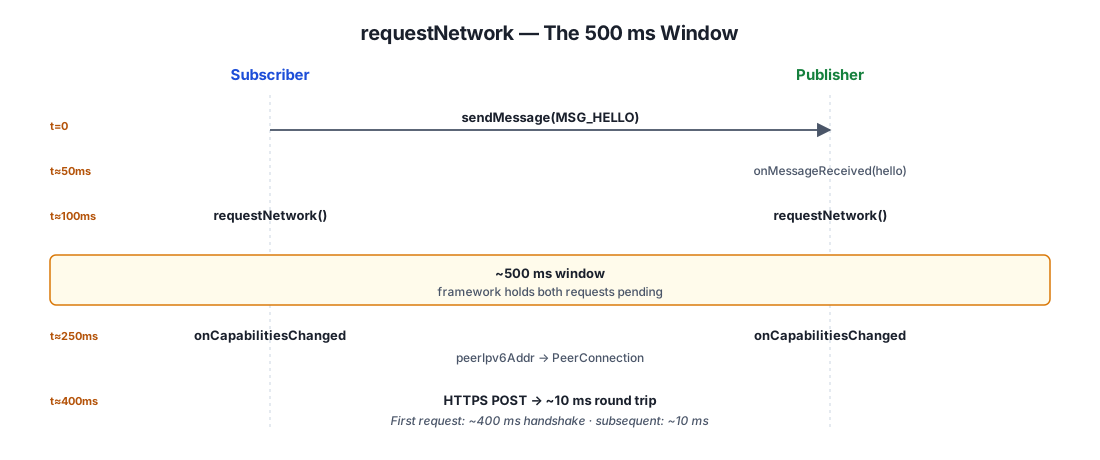
What the onUnavailable callback means
onUnavailable fires when the framework rejects the requestNetwork
before finding a matching peer request. The PeerHandle itself is still
valid — only the NDP (Neighbor Discovery Protocol) pairing failed
because the other side hadn't registered yet. PlainApp deliberately does
not call session.invalidatePeerHandle in this case, because
invalidating the handle would discard the only signal that
onServiceDiscovered was ever called (it fires once per peer per
subscribe session lifetime). With the handle preserved, the retry can
reuse it instead of waiting for a fresh discovery.
The same applies to the publisher-side handle from onMessageReceived —
the publisher keeps the publishPeerHandles[fromCid] entry across failed
attempts, so the subscriber's next hello re-uses the cached handle instead
of being dropped.
Per-Peer Link Pool & Idle Sweeping
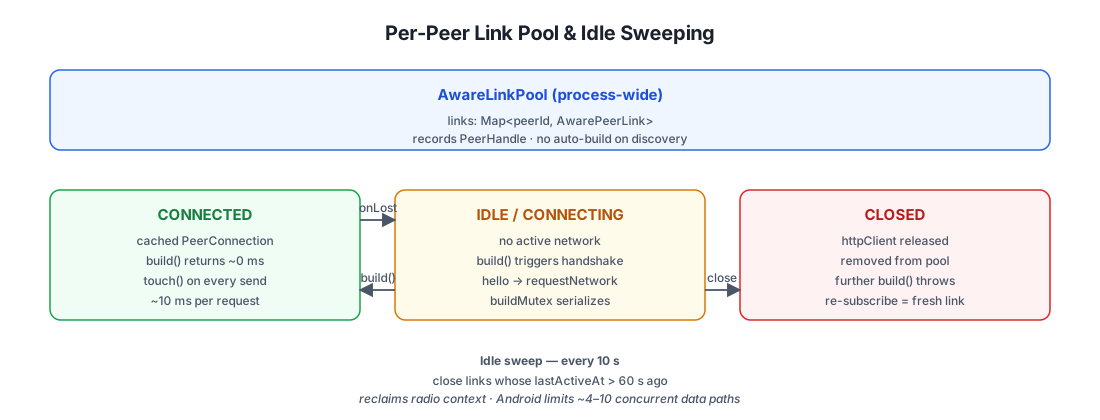
Each paired peer gets its own AwarePeerLink object, owned by the
process-wide AwareLinkPool. The pool handles discovery events, link
reuse, and idle eviction.
Why no auto-build on discovery?
The pool explicitly does not build a link when
onServiceDiscovered fires. This is a critical decision: a busy coffee
shop might have 100 PlainApp devices all publishing the "plain-peer"
service. If each discovery triggered a requestNetwork, the framework
would be flooded with NDP setup attempts and the Wi-Fi radio would be
saturated.
Instead, the pool only records the PeerHandle and waits for one of:
- The local user sends a message →
WifiAwareTransport.send→pool.buildLink(peer)(sender-side trigger). - The remote peer sends a hello →
onPublishHelloReceived→buildLink(peer)(receiver-side trigger). - The remote peer sends a ready →
onSubscribeReadyReceived→buildLink(peer)(receiver-side trigger).
This way, links are only built for peers that the user is actually exchanging messages with — not every PlainApp device in radio range.
Idle sweep
Every 10 seconds, the pool walks all links and closes any whose
lastActiveAt is older than 60 seconds. Each send and downloadFile
calls link.touch() to refresh the timestamp. This reclaims the Wi-Fi
radio context and OkHttp connection pool for peers the user has stopped
chatting with — important because Android limits the number of
simultaneous Aware data paths to roughly 4–10 (device-dependent).
IPv6 Addressing & the plain-aware-peer DNS Trick
Wi-Fi Aware data paths use link-local IPv6 only. There is no IPv4, no
DNS server, no DHCP. The peer's IPv6 address is delivered via the
WifiAwareNetworkInfo.peerIpv6Addr field in
onCapabilitiesChanged — a fe80::... address that's only meaningful
on the Aware network interface.
PlainApp needs to send HTTPS requests to this address, but OkHttp's
https:// URL parsing refuses raw IPv6 literals in a hostname
(https://[fe80::abcd]:8443/ works, but routing it through a custom
Dns resolver is cleaner). The trick:
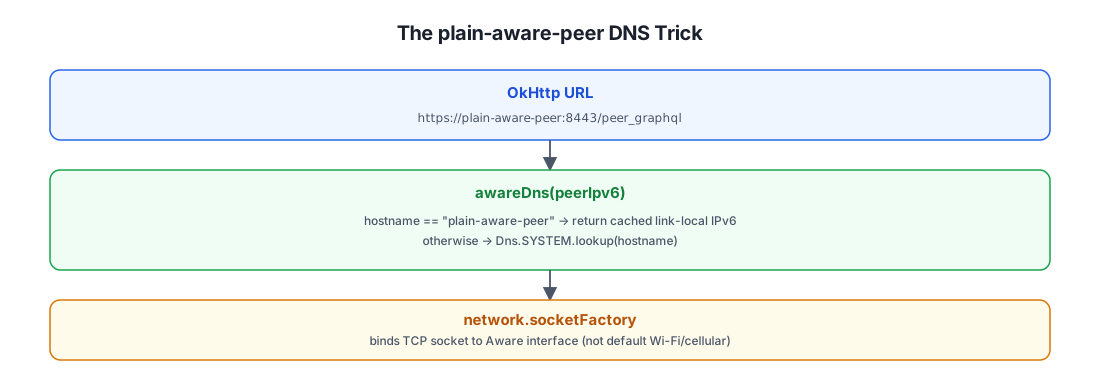
Why a sentinel hostname?
The alternative — passing the IPv6 literal directly in the URL — would
require every call site to know about the link-local address. By using a
sentinel hostname, the URL construction is identical for LAN and Aware:
both produce a valid https://<host>:<port>/peer_graphql URL that OkHttp
can parse. The only difference is the Dns implementation bound to the
client — LAN uses the system DNS, Aware uses awareDns(peerIpv6) which
returns the cached link-local address for the sentinel hostname and
falls through to Dns.SYSTEM for anything else.
Why network.socketFactory?
Android's Network object represents a specific network interface (in
this case, the Aware data path). By calling network.socketFactory and
passing it to OkHttp's socketFactory config, we force all TCP sockets
to be created on the Aware interface — not the default Wi-Fi or
cellular interface. Without this, the OS would route the request via the
default network, where the link-local IPv6 is unreachable, and the
request would fail with ENETUNREACH.
Cryptography: PMK Derivation & ChaCha20 Reuse
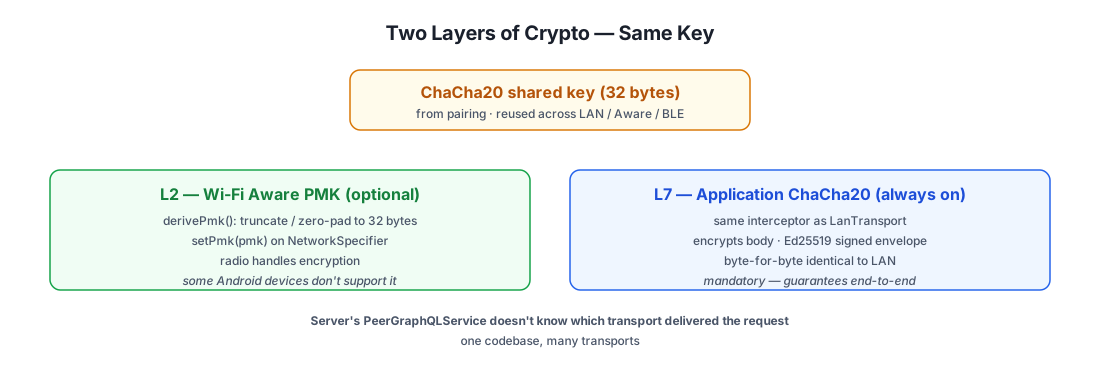
Wi-Fi Aware supports an optional PMK (Pairwise Master Key) for the data path. When set, the L2 link itself is encrypted with that PMK — the Wi-Fi radio handles encryption, no application-layer crypto needed.
PlainApp derives the PMK from the same ChaCha20 shared key that
LanTransport and BleTransport use for application-layer encryption:
Why truncate to 32 bytes?
The Wi-Fi Aware PMK must be exactly 32 bytes (256 bits). The ChaCha20
shared key from pairing is also 32 bytes in the normal case, so the
raw.size == 32 branch is the common path. The truncation/padding
fallback handles the (theoretical) case where the key was stored shorter
— padding with zeros to 32 bytes is a defensive measure, not something
that happens in practice with properly paired peers.
The signed envelope is identical to LAN
Because createCryptoHttpClient is the same factory used by
LanTransport, the L7 crypto on Aware is byte-for-byte identical to
LAN. The server-side PeerGraphQLService doesn't know (or care) which
transport delivered the request — it just sees a signed, encrypted
GraphQL payload and decrypts it with the peer's shared key. This is the
"one codebase, many transports" principle documented in
Chat Architecture.
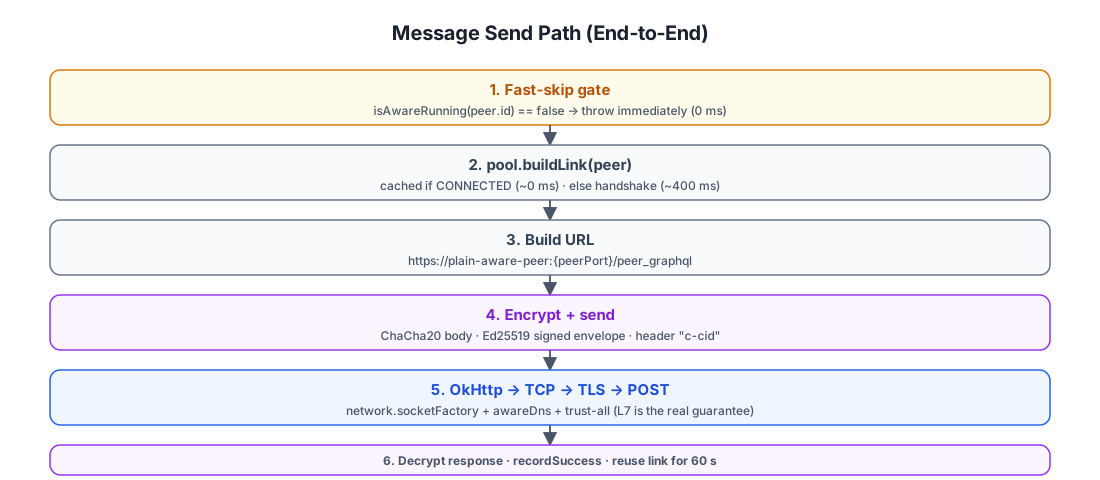
Message Send Path (End-to-End)
Putting it all together — what happens when a chat message is sent over Wi-Fi Aware:
Notable design choices
- Connection reuse. Unlike
BleTransport, which tears down the GATT connection after every request,WifiAwareTransportreuses the Aware data path for as many requests as the user makes within the 60 s idle window. The first request pays the ~400 ms handshake; subsequent requests are ~10 ms round trips. - Same crypto as LAN. The ChaCha20 interceptor and signed envelope are
byte-identical to LAN. The peer's
PeerGraphQLServicedoesn't know which transport delivered the request. - No preemption on link failure. If
buildLinkfails, the transport throwsTransportUnavailableand the router falls through to BLE. There is no retry withinsend—AwarePeerLink.buildalready does its own internal retry loop (withMAX_BUILD_ATTEMPTS = 1on the client, more if the prewarmer has primed both sides).
File Download Path (End-to-End)
File downloads over Aware reuse the same data path as chat messages, but use a separate OkHttp client configured for streaming large files:
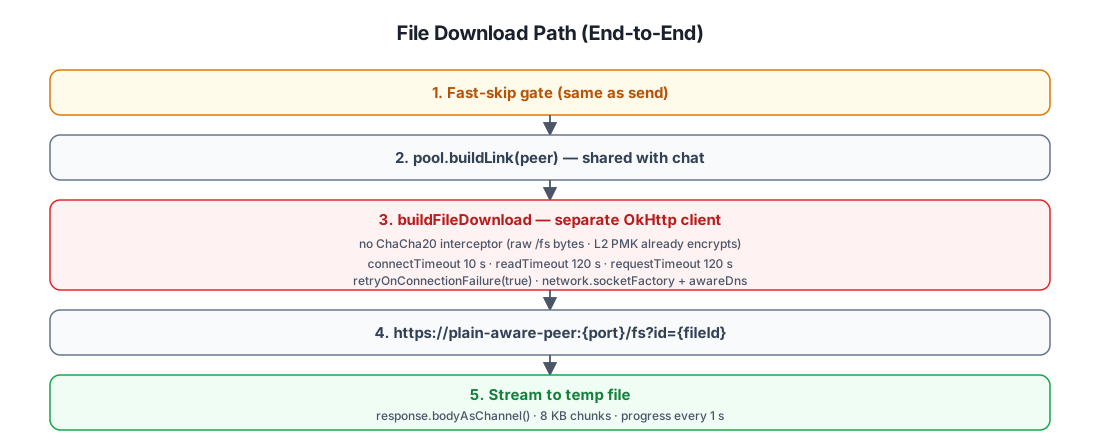
Why a separate client for downloads?
The chat client (AwareHttpClientFactory.build) has a 30 s
requestTimeoutMillis — appropriate for GraphQL mutations but
catastrophic for a 100 MB file download. The download client
(buildFileDownload) sets:
connectTimeoutMillis = 10_000(longer than chat's 5 s, more tolerant of slow first-packet on a fresh data path)readTimeout = 120 sper read (vs the implicit default of 10 s)requestTimeoutMillis = 120_000(2 minutes — enough for most files)retryOnConnectionFailure(true)— a dropped mid-download read is retried instead of failing the whole transfer
It also omits the ChaCha20 interceptor. The /fs endpoint serves raw
file bytes (not a signed GraphQL envelope), and the L2 PMK (when present)
already encrypts the radio link. Double-encrypting a 50 MB video with
ChaCha20 in software would waste CPU and slow the transfer.
Streaming, not buffering
Like the BLE path, Aware downloads stream the file through a
ByteReadChannel — the file is written to a temp file as bytes arrive,
not buffered in memory. PeerFileDownloader reads 8 KB chunks and emits
progress events every second. The same DownloadedResponse /
PeerFileDownloader / DownloadQueue pipeline is reused across all
transports — transport-specific only the channel source.
Prewarming: BLE-Triggered Aware Startup
The biggest user-visible latency in the Aware path is the first handshake — if both sides haven't started Aware yet, the user's first message has to wait for:
- Local Aware session attach (~1 s)
- Local publish + subscribe start (~1 s)
- Remote peer's Aware startup (~2 s over BLE)
- Mutual discovery (~1 s)
- NDP handshake (~400 ms)
That's ~5 seconds before the first byte is sent. To hide this latency,
PeerTransportPrewarmer runs on ChatPage entry and triggers the
remote peer's Aware startup via BLE:
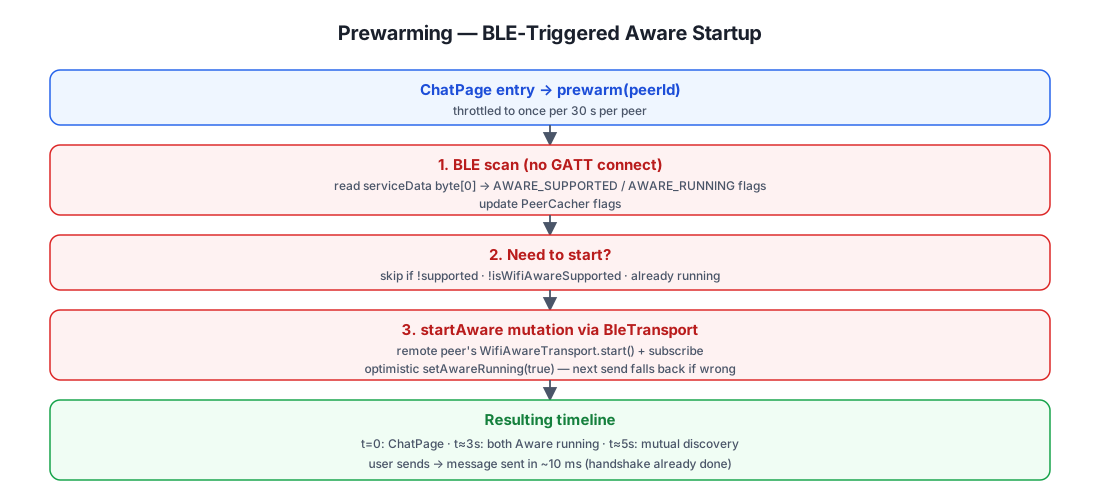
The dual role of BLE
BLE serves two purposes here:
- Read the peer's current Aware state (cheap, no GATT connect — the
scan response's
serviceDatabyte0 carries the Aware flags). - Trigger the peer to start Aware if it supports but isn't currently
running it. This goes through the regular
BleTransport.sendpath — astartAwareGraphQL mutation encrypted with the shared ChaCha20 key, delivered via GATT RPC to the peer's/peer_graphqlendpoint.
This is one of the few places where the transports cooperate rather than just fall back: BLE is used to pre-emptively upgrade the session to the faster Aware transport, before the user even notices.
Why optimistic setAwareRunning(true)?
The startAware mutation returns success as soon as the remote peer's
resolver invokes WifiAwareTransport.start() — but the Aware session
isn't actually attached yet (onAttached fires asynchronously). PlainApp
marks the peer as awareRunning = true optimistically, because:
- If it actually started, the next
sendwill use Aware (fast). - If it didn't (e.g. peer's Wi-Fi is off), the next
send'sbuildLinkwill fail withTransportUnavailableand fall back to BLE naturally. - The cost of a false positive is one ~5 s timeout, not a permanent
block —
PeerCircuitBreakerrecords the failure but doesn't open the BLE leg (BLE only opens on its own failures).
Why throttle to 30 s?
PeerTransportPrewarmer.prewarm(peerId) records a timestamp per peer
and refuses to re-run within 30 s. This is because the user navigates
back and forth between chat list and chat page frequently — without
throttling, every navigation would trigger a BLE scan + startAware
mutation, draining battery and spamming the BLE radio. The 30 s window
is short enough to catch a peer that just came online (e.g. user opened
the app on the remote device) but long enough to avoid spurious re-runs.
Failure Modes & the Fast-Skip Flag
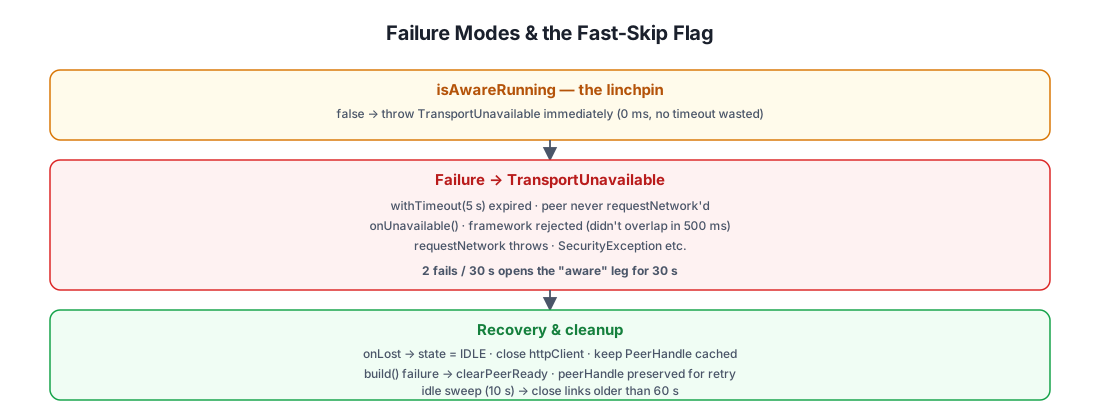
Aware has more failure modes than any other transport. The
isAwareRunning fast-skip flag is the single most important
optimization in the whole module — without it, every send would
waste 10 s on buildLink timing out before falling back to BLE.
The isAwareRunning flag is the linchpin
Without this single boolean, every Aware send would either:
- Always attempt
buildLink→ 10 s timeout on every send to a peer whose Aware isn't running. - Always skip Aware → never use it even when both sides have it running.
The flag is refreshed from two sources, in order of authority:
- BLE scan response (cheap, no GATT connect) — set by
PeerTransportPrewarmer.refreshAwareFlagFromScan. The peer advertises its Aware state in the 9-byteserviceDatapayload (byte0 bitfield). - GATT DISCOVER reply (authoritative) — set by
PairingTransport.scanAndDiscoverwhen a full discovery happens. This overwrites the scan hint.
When false, WifiAwareTransport.send and downloadFile throw
TransportUnavailable immediately — no scan, no handshake, no
timeout. The router falls through to BLE in microseconds.
Key Constants Reference
| Constant | Value | Where | Purpose |
|---|---|---|---|
AwareSession.SERVICE_NAME | "plain-peer" | Discovery | Service name published & subscribed by every PlainApp device |
AwareSession.PEER_HANDLE_MAX_AGE_MS | 30 000 | PeerHandle cache | Discard stale handles (peer's publish session may have been restarted) |
AwareSession.READY_TIMEOUT_MS | 15 000 | Handshake | Subscriber wait for publisher's ready receipt |
AwareSession.MSG_HELLO | 0 | Handshake | Subscriber → Publisher message ID |
AwareSession.MSG_READY | 1 | Handshake | Publisher → Subscriber message ID |
AwarePeerLink.MAX_BUILD_ATTEMPTS | 1 | Handshake (client only) | Single attempt — was 3, now 1 because prewarmer primes both sides |
AwarePeerLink.ATTEMPT_TIMEOUT_MS | 5 000 | Handshake | Per-attempt timeout — was 10 s, halved to speed fallback |
AwarePeerLink.RETRY_DELAY_MS | 500 | Handshake | Delay between retry attempts (client only) |
AwarePeerLink.REQUEST_TIMEOUT_MS | 30 000 | NDP | connectivityManager.requestNetwork timeout |
AwareLinkPool.IDLE_TIMEOUT_MS | 60 000 | Pool sweep | Close idle links after 60 s of inactivity |
AwareLinkPool.IDLE_SWEEP_INTERVAL_MS | 10 000 | Pool sweep | Sweep interval |
AwareHttpClientFactory.AWARE_HOST | "plain-aware-peer" | DNS | Sentinel hostname resolved to peer IPv6 by custom Dns |
build chat client | connectTimeout 5 s, requestTimeout 30 s, ChaCha20 interceptor | ||
buildFileDownload | connectTimeout 10 s, readTimeout 120 s, requestTimeout 120 s, no crypto | ||
PeerTransportPrewarmer.PREWARM_TTL_MS | 30 000 | Prewarm | Throttle per peer |
PeerTransportPrewarmer.BLE_SCAN_TIMEOUT_MS | 15 000 | Prewarm | BLE scan timeout for refreshAwareFlagFromScan |
PeerCircuitBreaker.WINDOW_MS | 30 000 | Circuit breaker | Open duration after threshold |
PeerCircuitBreaker.MAX_FAILURES | 2 | Circuit breaker | Failures within window to open |
TempData.httpsPort | 8443 (default) | Server | Publisher's port advertised via WifiAwareNetworkSpecifier.setPort |
BleServiceData.AWARE_SUPPORTED | 0x01 | BLE scan response | Bit indicating peer supports Wi-Fi Aware |
BleServiceData.AWARE_RUNNING | 0x02 | BLE scan response | Bit indicating peer's Aware service is currently running |
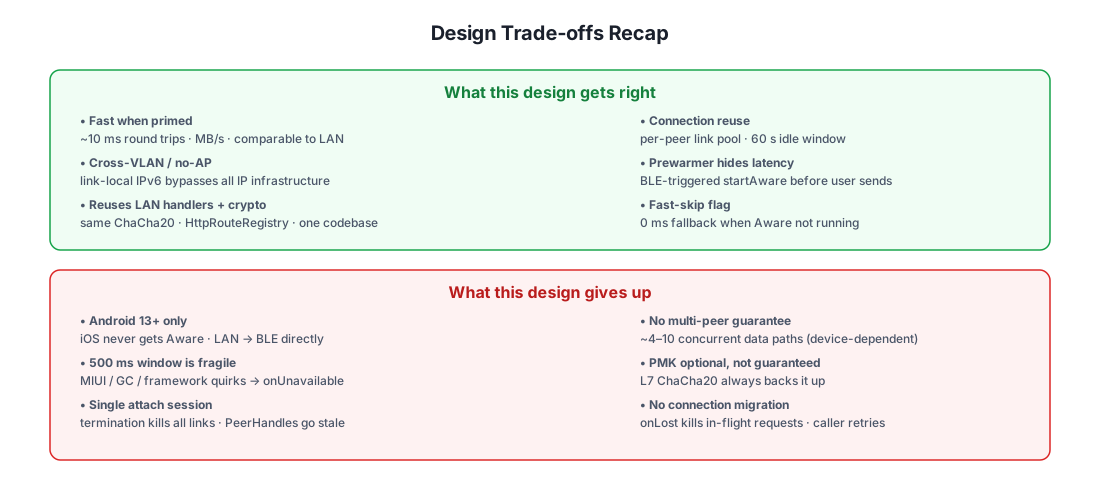
Design Trade-offs Recap
Further Reading
- Chat Architecture — how
WifiAwareTransportfits into theLAN → Aware → BLEfallback chain and the broader chat send/receive pipeline. - BLE Transport — the last-resort transport that takes over when Aware is unavailable; also the channel used by the prewarmer to trigger Aware startup on the remote peer.
- Pairing Flow — how the shared ChaCha20 key reused
as the Aware PMK is established, and how the BLE scan response flags
(
AWARE_SUPPORTED/AWARE_RUNNING) are populated.