
PlainApp Security Deep Dive
How PlainApp protects your data on local Wi-Fi — with evidence from the open-source code.
Why Does Local Network Security Matter?
When you use an app to manage your Android phone from a PC browser, your SMS, photos, contacts and files travel across your Wi-Fi network. Most apps send all of this as readable plain text. Anyone on the same network could see it.
You might think: "It's my home Wi-Fi, who would snoop?" But consider:
- Public Wi-Fi — Cafés, airports, hotels — anyone nearby can capture traffic
- Shared networks — Roommates, guests, or compromised IoT devices
- Router vulnerabilities — Outdated firmware with known exploits
If an app sends your SMS messages as plain text over HTTP, anyone with a free tool like Wireshark can read them. This isn't theoretical — it's trivially easy.
Most phone-management apps do exactly this. Open Chrome DevTools (F12 → Network tab) while using their web UI, and you can read every API call in plain JSON — SMS bodies, file paths, contact names, everything.
How PlainApp Is Different
PlainApp applies multiple layers of encryption and authentication. Here's what each layer does, in plain language.

GraphQL API — Ask for Only What You Need
Most apps use old-style REST APIs: one URL per resource, returning everything whether or not you need it. PlainApp uses GraphQL — a modern approach where the browser asks for exactly the data it needs, nothing more.
Why this matters:
- Less data exposed — If you only need a file name, that's all that's sent
- One endpoint — There's a single /graphql URL instead of dozens, which reduces the attack surface
- Per-query permissions — Each query checks its own permission (e.g., reading SMS requires READ_SMS permission even after you've logged in)
Encrypted API Calls (XChaCha20-Poly1305)
This is the biggest difference between PlainApp and most competitors.
Every API request and response — including both HTTP and WebSocket traffic — is encrypted with XChaCha20-Poly1305, in both HTTP and HTTPS modes. This is a modern AEAD encryption algorithm used by WireGuard VPN, Cloudflare, and Google's Tink library.
In simple terms:
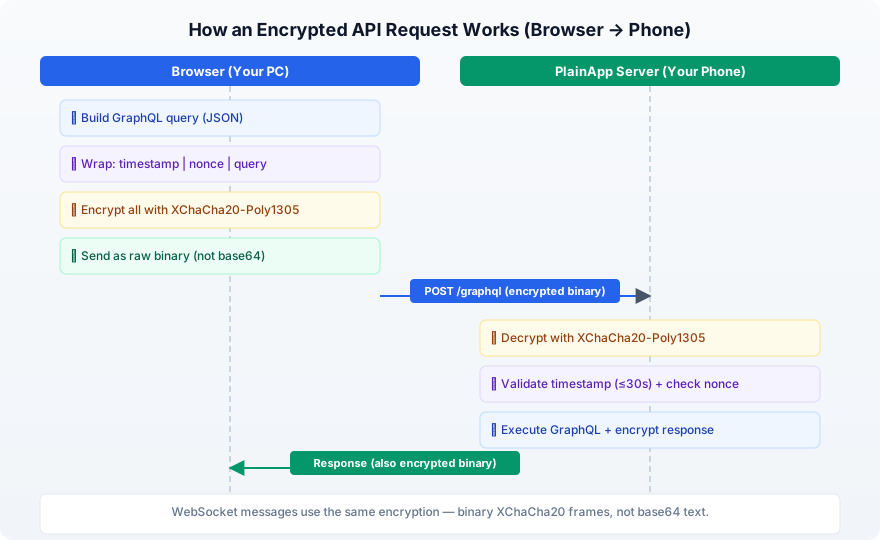
- 1Your browser builds a request (e.g., "show me my SMS")
- 2It wraps the request with a timestamp and a random nonce for replay protection
- 3It encrypts the entire payload into unreadable binary data with XChaCha20-Poly1305
- 4The encrypted binary is sent over the network — no base64, no JSON, pure binary
- 5Only your phone can decrypt and validate it
Even if someone intercepts the traffic, they see meaningless binary data — not readable JSON.
About the encryption:
- 256-bit key (extremely strong)
- 192-bit nonce (prevents certain attack types that affect other ciphers)
- Built-in tamper detection — if anyone modifies the data in transit, decryption fails
- Android side: powered by Google Tink
- Web side: powered by @noble/ciphers (a well-audited JavaScript crypto library)
Digital Signatures (Ed25519) — Device-to-Device
When two PlainApp devices communicate with each other (e.g., phone-to-phone chat), encryption alone isn't enough — each device needs to verify that the message truly came from the other device and wasn't forged.
timestamp
The receiving device verifies the signature using the sender's public key, and rejects any request with a timestamp older than 5 minutes. This prevents both forgery and replay attacks.
Secure Device Pairing (ECDH Key Exchange)
When two PlainApp devices pair with each other (e.g., two phones), they need a shared encryption key. But sending a key over the network would defeat the purpose.
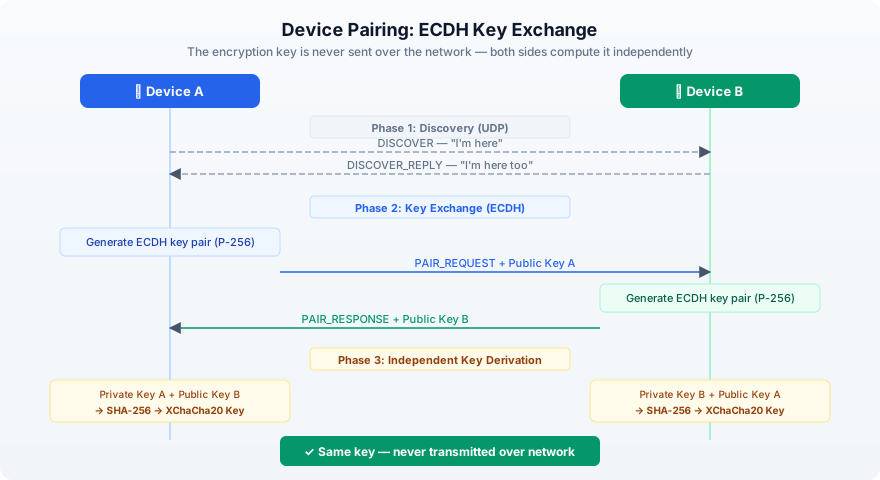
PlainApp solves this with ECDH (Elliptic Curve Diffie-Hellman) key exchange — the same math used in TLS, Apple's Secure Enclave, and WebAuthn:
- 1Each device generates a key pair (public + private)
- 2They exchange only their public keys
- 3Each device combines its own private key with the other's public key
- 4Both arrive at the same shared secret — without it ever crossing the network
Encrypted URLs — Hiding File Paths
Here's a detail most people don't notice: URL paths reveal information too.
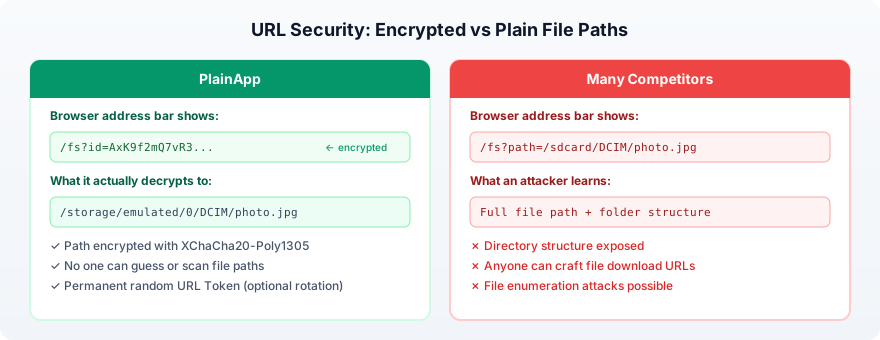
When you download a file, the URL tells the server which file you want. In many apps, the URL looks like:
/fs?path=/sdcard/DCIM/Camera/photo_2024.jpgAnyone sniffing traffic (or looking at browser history) can see exactly what file you accessed and your phone's folder structure.
PlainApp encrypts the file path in the URL:
/fs?id=AxK9f2mQ7vR3xP8nWz...The id parameter is the file path encrypted with XChaCha20-Poly1305 using a random key called the URL Token. By default, this key is permanent and persists across app restarts, so shared links keep working. No one can guess the real path, enumerate your files, or craft download URLs without the key.
HTTPS with Self-Signed Certificates
PlainApp generates a self-signed TLS certificate on your phone. This creates an encrypted HTTPS tunnel — the same technology banks and websites use.
The certificate uses:
- ECDSA with P-256 curve (same as major websites)
- SHA256 signature
- Stored in the app's private directory
Combined with the application-layer XChaCha20 encryption, this gives you two independent layers of encryption. Breaking one doesn't help without breaking the other.
Login Protection
PlainApp limits login attempts to prevent password guessing:
- 5 attempts per 60 seconds per IP address
- After that, connections are rejected
- Stale rate-limit records are automatically cleaned up
HTTP vs HTTPS: An Honest Note
PlainApp offers both HTTP and HTTPS modes. Here's the honest difference:
| HTTP Mode | HTTPS Mode | |
|---|---|---|
| File path URLs | Encrypted (XChaCha20) | Encrypted (XChaCha20) |
| API calls | Encrypted (XChaCha20) | Encrypted (XChaCha20 + TLS) |
| File downloads | Not encrypted in transit | Encrypted by TLS |
| Who is it for | Beginners (no browser SSL warning) | Privacy-conscious users |
Both modes encrypt API calls with XChaCha20-Poly1305 — your SMS, contacts, and other data are always encrypted regardless of HTTP or HTTPS.
HTTP mode exists because self-signed certificates trigger a browser warning ("Your connection is not private"). For less technical users, this warning is confusing and scary. HTTP avoids this friction.
However, HTTP mode does not encrypt file transfers. If you're on a shared or public network, always use HTTPS.
Recommendation: Use HTTPS whenever possible. Accept the browser's self-signed certificate warning — it's normal and expected for a local-network app.
Supply Chain Security — Fewer Dependencies, Less Risk
A security threat that many users don't think about: supply chain attacks. When an app uses hundreds of third-party libraries, any one of them could be compromised — injecting malicious code that steals data, mines cryptocurrency, or opens backdoors.
This is especially dangerous in the JavaScript ecosystem. In recent years, popular npm packages like event-stream, ua-parser-js, and colors were hijacked to inject malicious code into millions of projects. If a phone management app's web UI pulls in hundreds of JS packages, each one is a potential attack vector.
PlainApp takes a deliberate approach: use as few dependencies as possible, and build custom code when it makes sense.
Android App (plain-app)
- No dependency injection framework (no Hilt, no Dagger) — uses simple singletons
- Crypto handled by only 3 well-known libs: Google Tink, Bouncy Castle, and the built-in Java Cryptography Extension
- Server runs on Ktor (official Kotlin framework by JetBrains) — no obscure third-party server libraries
Web UI (plain-web)
Only 28 runtime dependencies — far fewer than typical web apps. Several things that would normally require npm packages are built from scratch:
| Feature | Typical App | PlainApp |
|---|---|---|
| Notification sounds | howler.js / tone.js | Custom Web Audio API synth |
| UUID generation | uuid npm package | Hand-written RFC 4122 implementation |
| File uploads | uppy / axios | Custom chunked upload with queue |
| WebRTC video | Twilio / Daily.co SDK | Hand-written PeerConnection code |
| HTTP client | axios / ky | Native browser fetch |
Crypto on the web side uses @noble/ciphers — a well-audited, zero-dependency JavaScript crypto library — instead of pulling in large, bloated alternatives.
Why this matters
Every dependency you add is code you don't control. PlainApp's approach means:
- Fewer places for malicious code to hide
- Smaller attack surface
- Easier to audit (the entire codebase is open source)
- No risk from abandoned or hijacked npm packages
What Many Competitors Get Wrong
This isn't about naming specific apps. It's about common patterns across the category:
| Security Aspect | PlainApp | Common in Competitors |
|---|---|---|
| API traffic | Encrypted (XChaCha20) in both HTTP and HTTPS | Plain JSON over HTTP |
| WebSocket traffic | Encrypted binary frames (XChaCha20) | Plain text JSON or no WebSocket |
| Auth token handling | Used as encryption key, never in headers | Sent in HTTP headers (easily leaked) |
| File URLs | Encrypted path IDs | Plain text paths exposed |
| Key exchange | ECDH (P-256) | None |
| Request signing | Ed25519 (device-to-device) | None |
| Replay protection | 30s window + nonce (web); 5 min + signature (device) | None |
| Login protection | Rate limiting + two-factor confirmation | Unlimited attempts |
| Data routing | 100% local, no cloud | Some route through cloud |
| Dependencies | Minimal, well-known libs | Hundreds of npm packages |
| Source code | Open source (GPL-3.0) | Mostly closed source |
The easiest way to check any app: open Chrome DevTools (F12) → Network tab while using the app. If you can read API responses as JSON, the app has no encryption.
Verify It Yourself
PlainApp is fully open source. Every claim in this article can be verified in the code.
github.com/plainhub/plain-app (GPL-3.0)Automated, traceable, and tamper-resistant release pipeline
All install packages are automatically built by GitHub and F-Droid infrastructure. Builds are traceable, highly secure, and leave no manual build intervention footprint. PlainApp is one of the very few Android apps that provide both verifiable builds (SLSA) and VirusTotal-scanned releases — fully automated and user-verifiable.
Automated Builds on GitHub and F-Droid
Release artifacts are generated by CI pipelines instead of local manual packaging. Every artifact can be traced back to source commits and reproducible build workflows.
SLSA Provenance (Level 3) + VirusTotal Scan
Each release includes SLSA provenance attestations and VirusTotal scan results, making the supply chain auditable and helping users verify integrity before installation.
Frequently Asked Questions
Is PlainApp really encrypted if I use HTTP mode?
Yes. All API calls (SMS, contacts, files list, etc.) are encrypted with XChaCha20-Poly1305 in both HTTP and HTTPS modes. HTTP mode only leaves file downloads unencrypted. For full protection, use HTTPS.
Why does my browser show a security warning?
PlainApp uses a self-signed TLS certificate for encryption. Since it's not issued by a public Certificate Authority, your browser shows a warning. This is normal and expected for a local-network app. Click 'Advanced' and 'Proceed' to continue.
Can someone on the same Wi-Fi see my data?
With PlainApp, no. API calls are encrypted with XChaCha20-Poly1305, and in HTTPS mode file transfers are also encrypted by TLS. With most competitor apps, yes — their API calls are sent as plain text JSON.
How does PlainApp compare to a VPN?
A VPN encrypts traffic between your device and the VPN server. PlainApp encrypts traffic between your phone and browser on the local network. They serve different purposes — PlainApp secures local device management, while a VPN secures internet traffic.
Is the code really open source?
Yes. PlainApp is licensed under GPL-3.0. The full source code is available at github.com/plainhub/plain-app. You can inspect every encryption implementation, build from source, or contribute.
Take back control of your phone.
No cloud middleman. No monthly fees. Just your phone and your browser.