
The RSS view in the web dashboard is a three-pane reader for the subscription list that lives on your Android phone. Visit the URL shown in the PlainApp app from any browser on the same Wi-Fi network and you'll get a desktop layout: feed sidebar on the left, entry list in the middle, and the article reader on the right.
Because the dashboard talks to the phone directly, your subscriptions and cached articles stay in sync with the on-device reader — the phone's database is the single source of truth, and feed fetching itself still happens on the phone.
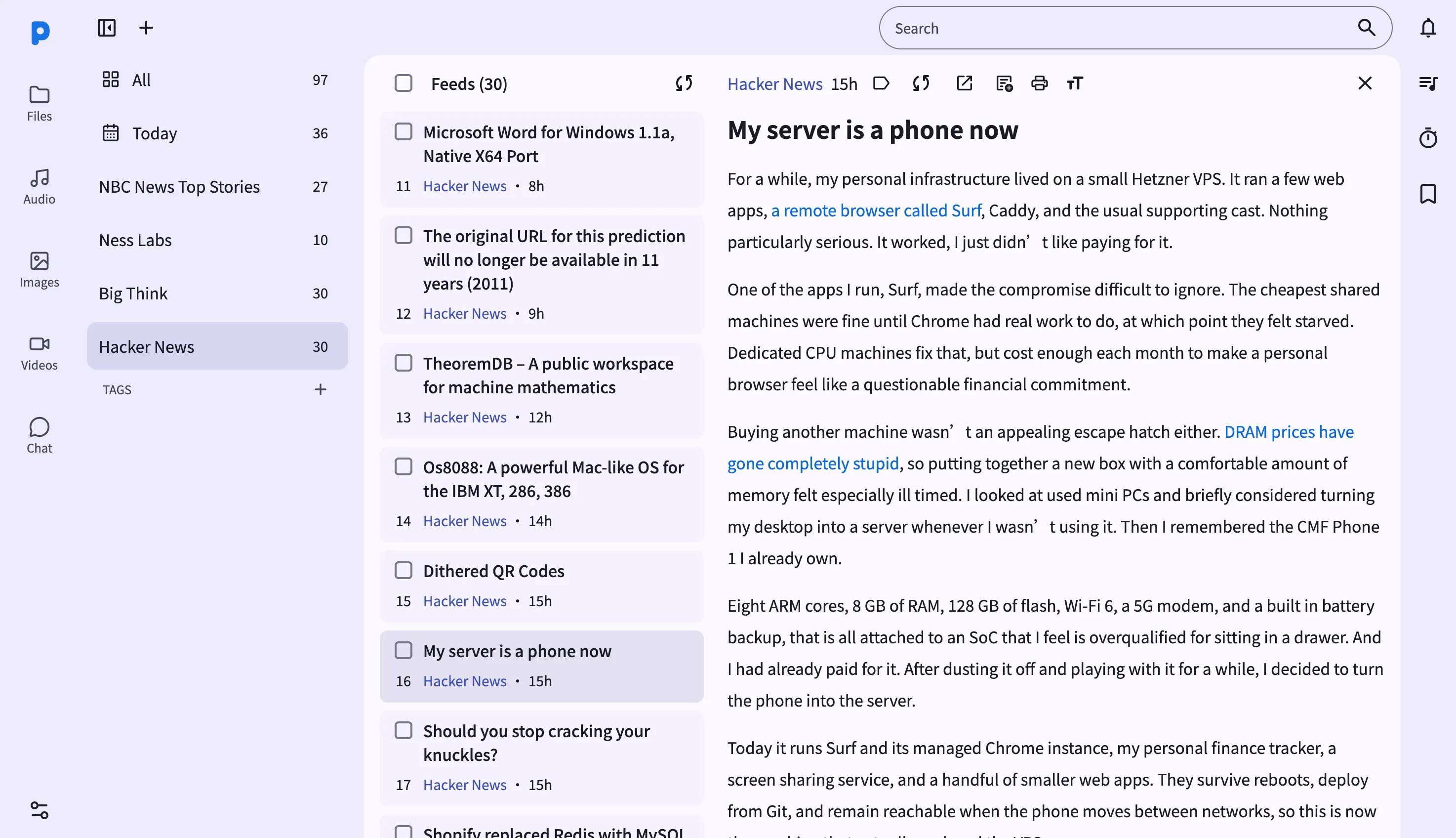
Key capabilities
- Sidebar with All and Today filters — browse every subscription with live unread counts, or narrow to just what arrived today.
- Save an article to Notes — one click copies an entry straight into your Notes archive, so a great article survives even after it scrolls out of the feed.
- Sync full content on demand — if a feed only publishes summaries, the sync-content button fetches the full article body for that entry.
- Tag entries — apply tags to individual articles and filter by them from the sidebar, the same tagging system shared with notes and files.
- Font size controls and print — bump the reading font up or down, or send the article straight to your printer, right from the reader toolbar.
- OPML import and export — bring subscriptions in from another reader, or export your full list, from the sidebar menu.
- Open the original article — jump straight to the publisher's own page in a new tab whenever you want the live version.
Walkthrough
- Open the RSS page from the sidebar. The middle list shows the All timeline — recent entries across every subscription.
- Browse the feed list — click Today to narrow to entries from the last day, or click a specific feed to see only its entries.
- Click an entry to open it in the right-hand reader pane.
- Save it for later — click the save-to-notes button to copy the article into your Notes archive.
- Adjust the read — use the font-size buttons to make text bigger or smaller, or click print to send it to your printer.
- Manage feeds from the sidebar — edit a feed's name or URL, delete a subscription, or import/export your whole list as OPML.
Tips & tricks
- Tag an article the moment you finish it — tags are shared across notes, files, and feed entries, so a
researchtag can pull together sources from anywhere in PlainApp. - Use sync content on feeds that only publish short summaries — it fetches the full article body without you leaving the reader.
- OPML import supports nested categories from other readers, so a big export from another app comes across with its folder structure intact.
Privacy & security notes
- The web dashboard is served over HTTPS with a self-signed certificate, with all traffic further encrypted with XChaCha20-Poly1305 layered on top of TLS.
- The web dashboard binds to your local network only — it is not reachable from the internet unless you explicitly set up port forwarding.
- Feed fetching still happens on the phone — the browser only reads what the phone has already cached. Publishers never see your browser's IP address.
Related features
- RSS Reader on Android — the on-phone reader for when you're away from a computer.
- Markdown Notes in the Web Dashboard — where "save to notes" articles end up.
- File Management in the Web Dashboard — manage the OPML files you import and export.